
Detailed answers to the most common questions about creating, delivering and tracking plans.
⚡Module · Clinical
Build the plan,
deliver the treatment.
From the first proposal to the last crown delivered — one place to plan, approve, deliver and track every stage of treatment, on every tooth, with every doctor.
8
sub-features
5
lifecycle stages
4
unit types
AM
Plan #1
Ana Maria · #PL-2026-0142
55% Stage: 2
Details
Services
Progress
Appointments
Files
Log
Plan type
Mixed
General dentist
MIDr. Ionescu Maria
Stages
Stage 1: €450 · Stage 2: €1.250 · Stage 3: €1.250
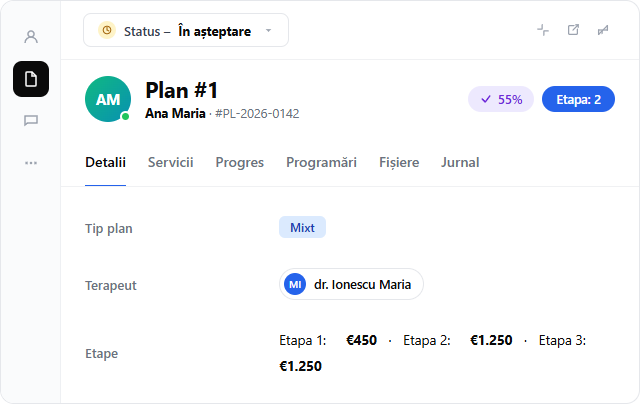
01 Plan lifecycle
From draft to delivered — every stage with clear rules.
Five well-defined stages, validation at each transition, soft-delete on closing. A plan never gets “left hanging” — you always know where it stands and what comes next.
1
Draft
2
Proposed
3
Accepted
4
In progress
5
Completed
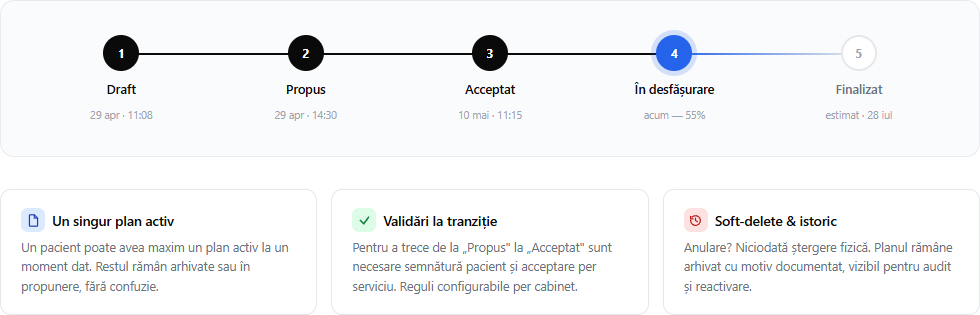
Single active plan
A patient can have at most one active plan at a time. The rest stay archived or proposed, with no confusion.
Transition validations
Moving from „Proposed" to „Accepted" requires the patient's signature and per-service acceptance. Rules configurable per practice.
Soft delete & history
Canceling? Never a hard delete. The plan stays archived with a documented reason, visible for audit and reactivation.
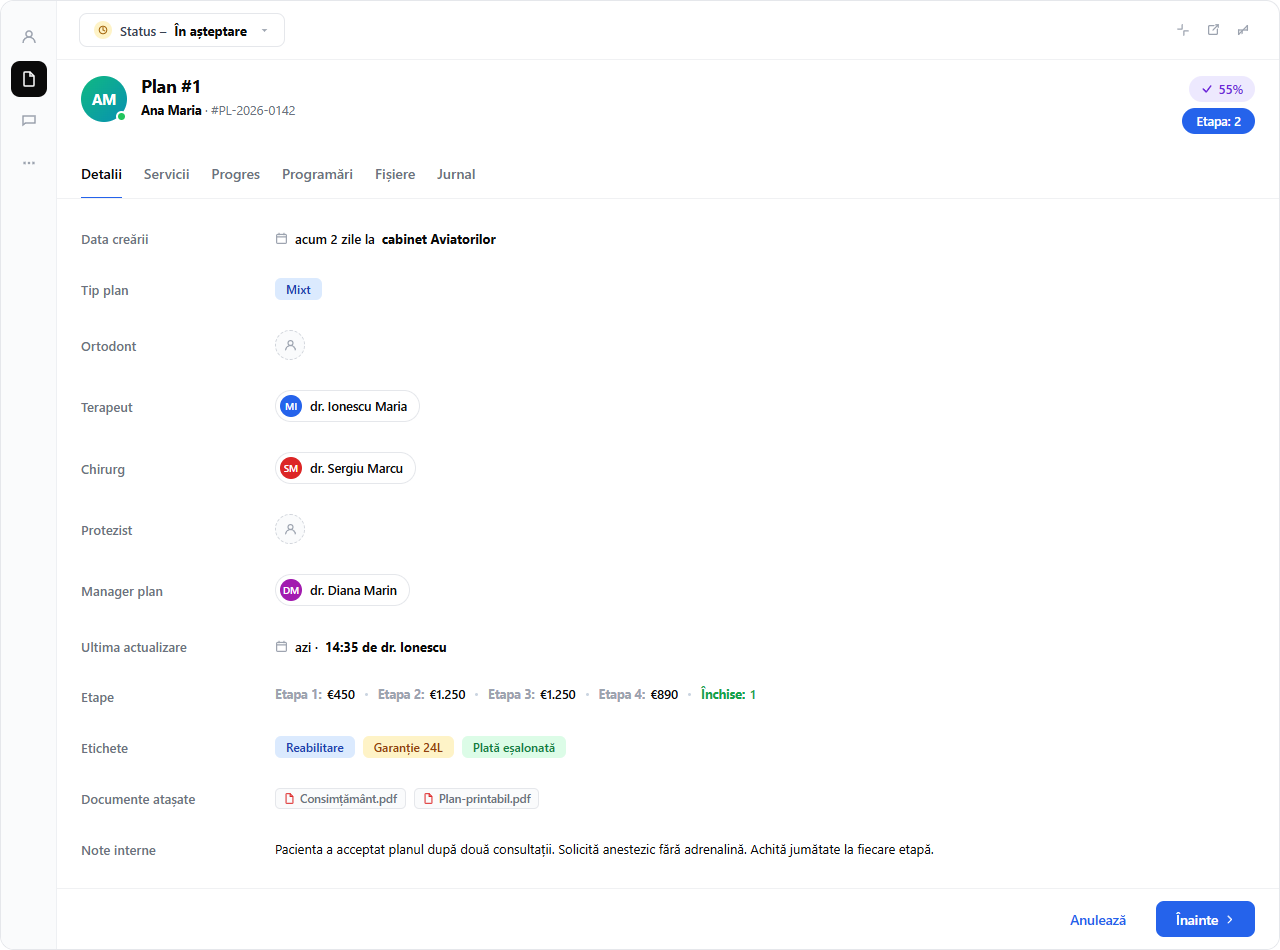
02 Details & participants
Who, what and when — all on the plan's first page.
Creation dates, plan type, specialists assigned per discipline and financial stages — all at a glance, editable with permissions.
- Specialists per discipline — assign an orthodontist, general dentist, surgeon, prosthodontist and plan manager. Separate permissions per role.
- Plan type — Restorative / Prosthetics / Surgery / Orthodontics / Mixed — defines the approval flow and reporting.
- Financial stages — split the total cost into stages for installment payments, visible in the summary and on the statement.
- Custom fields — internal code, insurance, clinical priority — anything you need to track on plans.
AM
Plan #1
Ana Maria · #PL-2026-0142
55%
Stage: 2
Details
Services
Progress
Appointments
Files
Log
Created on
2 days ago at Aviatorilor practice
Plan type
Mixed
Orthodontist
General dentist
MIDr. Ionescu Maria
Surgeon
SMDr. Sergiu Marcu
Prosthodontist
Plan manager
DMDr. Diana Marin
Last updated
today · 14:35 by Dr. Ionescu
Stages
Stage 1: €450
Stage 2: €1.250
Stage 3: €1.250
Stage 4: €890
Closed: 1
Labels
Rehabilitation
24-mo warranty
Installment payment
Attached documents
Consent.pdf
Printable-plan.pdf
Internal notes
The patient accepted the plan after two consultations. Requests adrenaline-free anesthetic. Pays half at each stage.
03 Structure & services
A complex plan that reads like a list.
Services grouped by stage and arch, each with unit price, quantity, discount and the dental chart applied. Plan bundles, stage dependencies, unit validation — all visible on a single screen.
AM
Plan #1
Ana Maria · #PL-2026-0142
55%
Stage: 2
Details
Services
Progress
Appointments
Files
Log
Service
Status
Price
Qty
Discount
Stage
Total
Chart
Upper arch 5 services · €4.768,20 · 1 warning
Professional dental cleaning
Completed
€68
1
−10%
Stage: 1
€61,20
✓
Endodontic retreatment incisor/canine/premolar
Pending
€180
7
−10%
Stage: 1
€1.134
15
14
13
12
11
21
22
Standard crown per tooth
Pending
€420
1
−10%
Stage: 2
€378
21
Standard crown on implant
Pending
€520
2
−10%
Stage: 2
€936
16
26
All-on-4 — implants + extractions + temporaries
Pending
€2.500
1
−10%
Stage: 3
€2.250
Upper arch
Lower arch 4 services · €3.024 · 1 warning
Professional scaling
Completed
€90
1
—
Stage: 1
€90
✓
Light-cured filling
Pending
€140
3
−10%
Stage: 1
€378
36
37
46
Molar extraction
In progress
€220
2
−10%
Stage: 2
€396
38
48
All-on-4 — implants + extractions + temporaries
Pending
€2.400
1
−10%
Stage: 3
€2.160
Lower arch
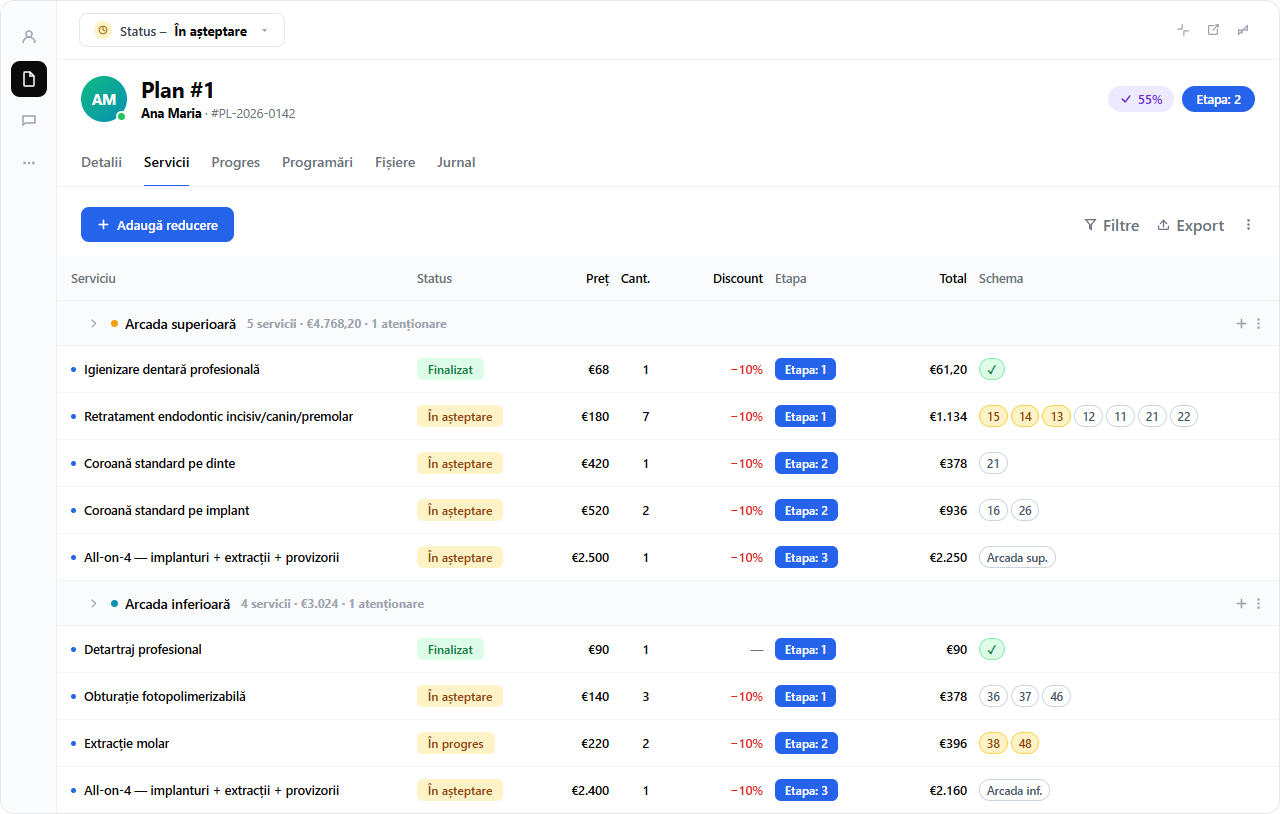
- Groups by stage / arch — organize services into sections with their own totals and logical order.
- 4 unit types — tooth (FDI), quadrant, arch, session. Automatic validation prevents impossible combinations.
- Service bundles — a single plan “item” can include several services (e.g. All-on-4).
- Dependencies between stages — Stage 3 can't start until Stages 1 and 2 are complete.
04 Pricing & discounts
Calculated automatically from the service catalog. No surprises.
Prices come from the service catalog — no price is ever changed by hand. Apply discounts per item, per stage or on the whole plan, plus active vouchers.
Service
Unit price
Qty
Discount
Subtotal
Professional cleaning
€68
1
−10%
€61,20
Endodontic retreatment
€180
14
−10%
€2.268
Standard crown per tooth
€420
1
−10%
€378
Standard crown on implant
€520
2
−10%
€936
All-on-4 bundle
€1.250
1
−10%
€1.125
Professional scaling
€90
1
—
€90
Subtotal€4.858,20
VIP discount (plan-level)−€200
Voucher MAI2026−€50
VAT included€0
Total plan cost€4.608,20
Per-item discount
−10% (×5)
Standard 10% discount applied to 5 of 6 services. Scaling is excluded from the discount policy.
VIP plan discount
−€200
Discount applied automatically for patients tagged „VIP”. Stacks with active vouchers.
Voucher MAI2026
−€50
Promotional voucher valid until May 31, 2026. Applies to plans > €1.000.
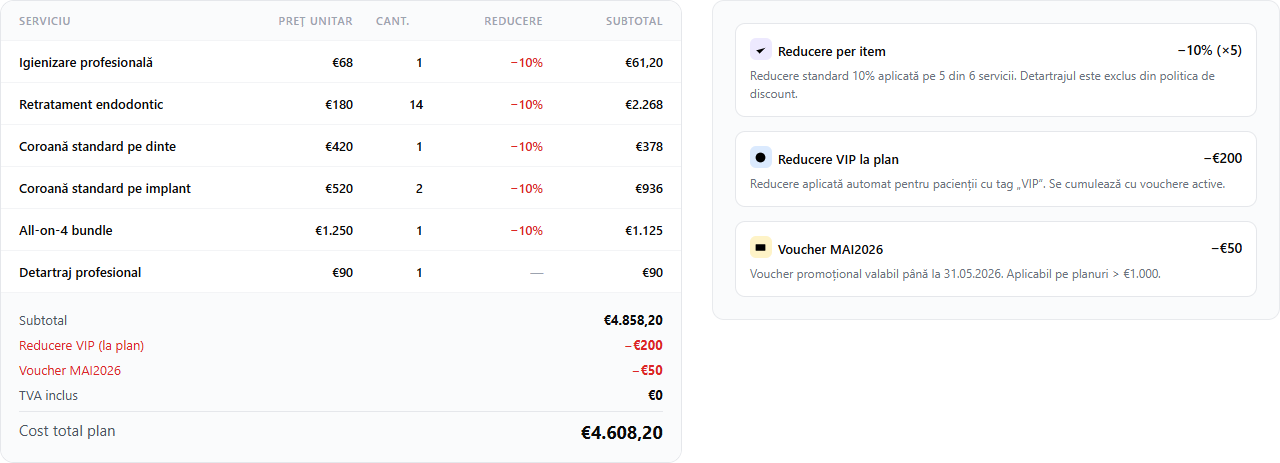
- Automatic calculation from the service catalog — unit price × quantity, no manual edits.
- Single source of truth — any price change is made in the service catalog and flows into all new plans.
- Discounts on 3 levels — per item, per stage or on the whole plan. Stackable or exclusive vouchers.
- Breakdown by arch — optionally see the total split by stage or arch, for transparency with the patient.
05 Treatment progress
Two dimensions: money and units. Equally important.
Instantly see how much money has actually been collected on the plan and how much of the actual work is done — broken down by discipline (restorative, prosthetics, surgery, orthodontics).
AM
Plan #1
Ana Maria · #PL-2026-0142
55% Stage: 2
Details
Services
Progress
Appointments
Files
Log
Type
Financial progress
Quantity progress
All progress
€2.456 / €4.608
55%
4 / 14 units
29%
Therapy
€1.890 / €2.329
81%
4 / 6 units
67%
Prosthodontics
€450 / €1.314
34%
0 / 3 units
0%
Surgery
€116 / €965
12%
0 / 4 units
0%
Orthodontics
—
—
No orthodontics
—
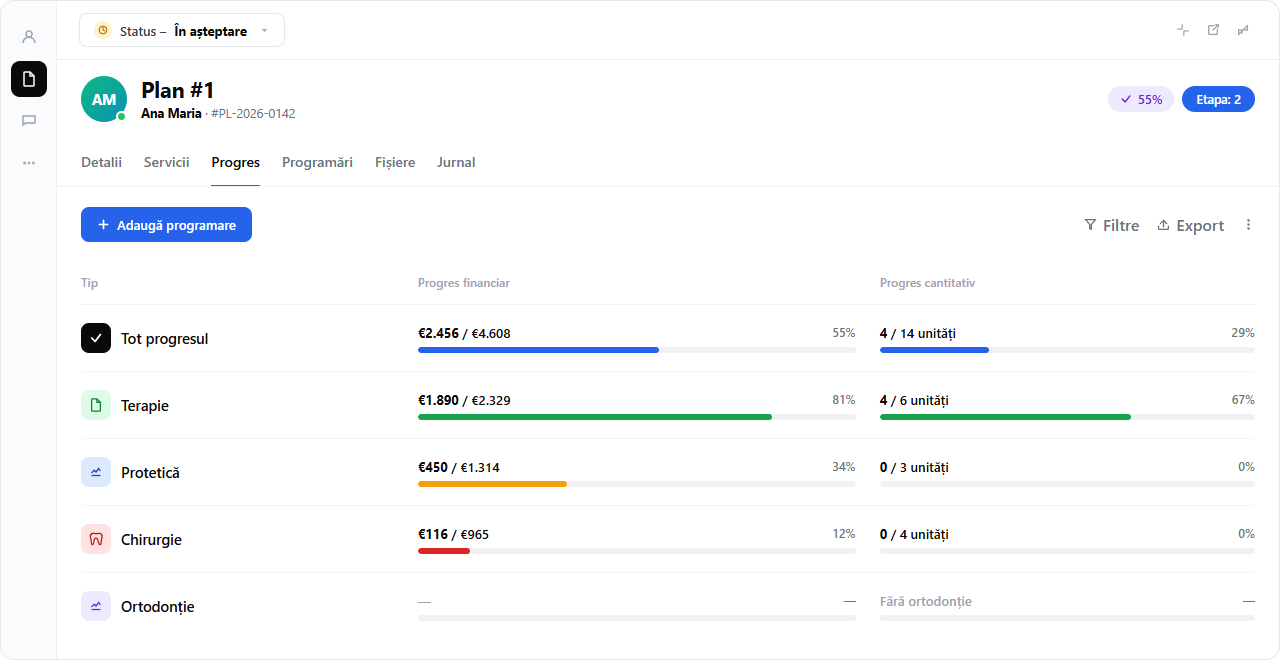
- Two parallel dimensions — money collected and units completed, each with its own progress.
- Breakdown by discipline — restorative, prosthetics, surgery, orthodontics. See where the plan gets stuck.
- Per-item statuses — planned, in progress, completed, canceled, under warranty (post-treatment).
- Partial completion — complete some of the teeth in an item (e.g. 3 of 4 crowns).
06 Appointments linked to the plan
Every appointment, connected to the stage it delivers.
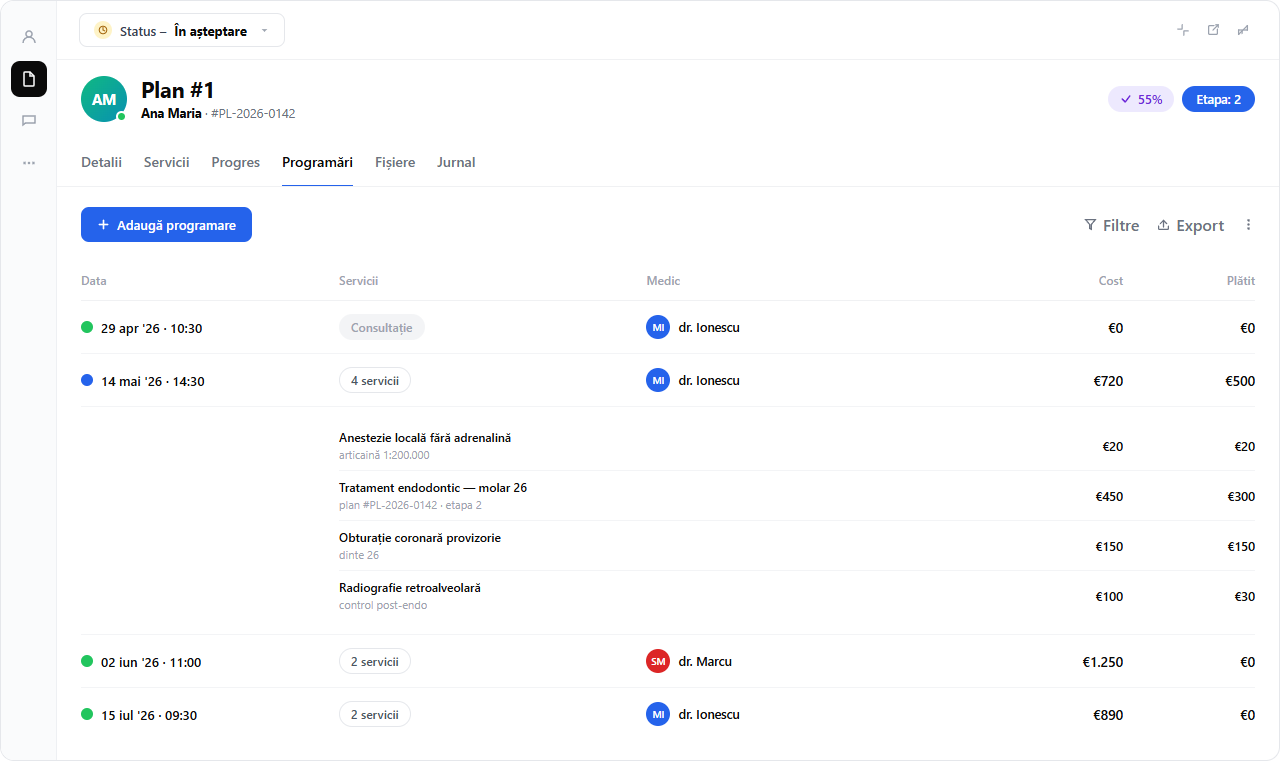
See every visit linked to the plan — upcoming, in progress, completed. Services performed per appointment, payments received, remaining costs.
AM
Plan #1
Ana Maria · #PL-2026-0142
55%
Stage: 2
Details
Services
Progress
Appointments
Files
Log
Date
Services
Doctor
Cost
Paid
Apr 29 '26 · 10:30
Consultation
MI
Dr. Ionescu
€0
€0
May 14 '26 · 14:30
4 services
MI
Dr. Ionescu
€720
€500
Local anesthesia without adrenalinearticaine 1:200.000
€20
€20
Root canal treatment — molar 26plan #PL-2026-0142 · stage 2
€450
€300
Temporary coronal fillingtooth 26
€150
€150
Periapical X-raypost-endo checkup
€100
€30
Jun 2 '26 · 11:00
2 services
SM
Dr. Marcu
€1.250
€0
Jul 15 '26 · 09:30
2 services
MI
Dr. Ionescu
€890
€0
07 Files & documents
All the plan's documents, right there.
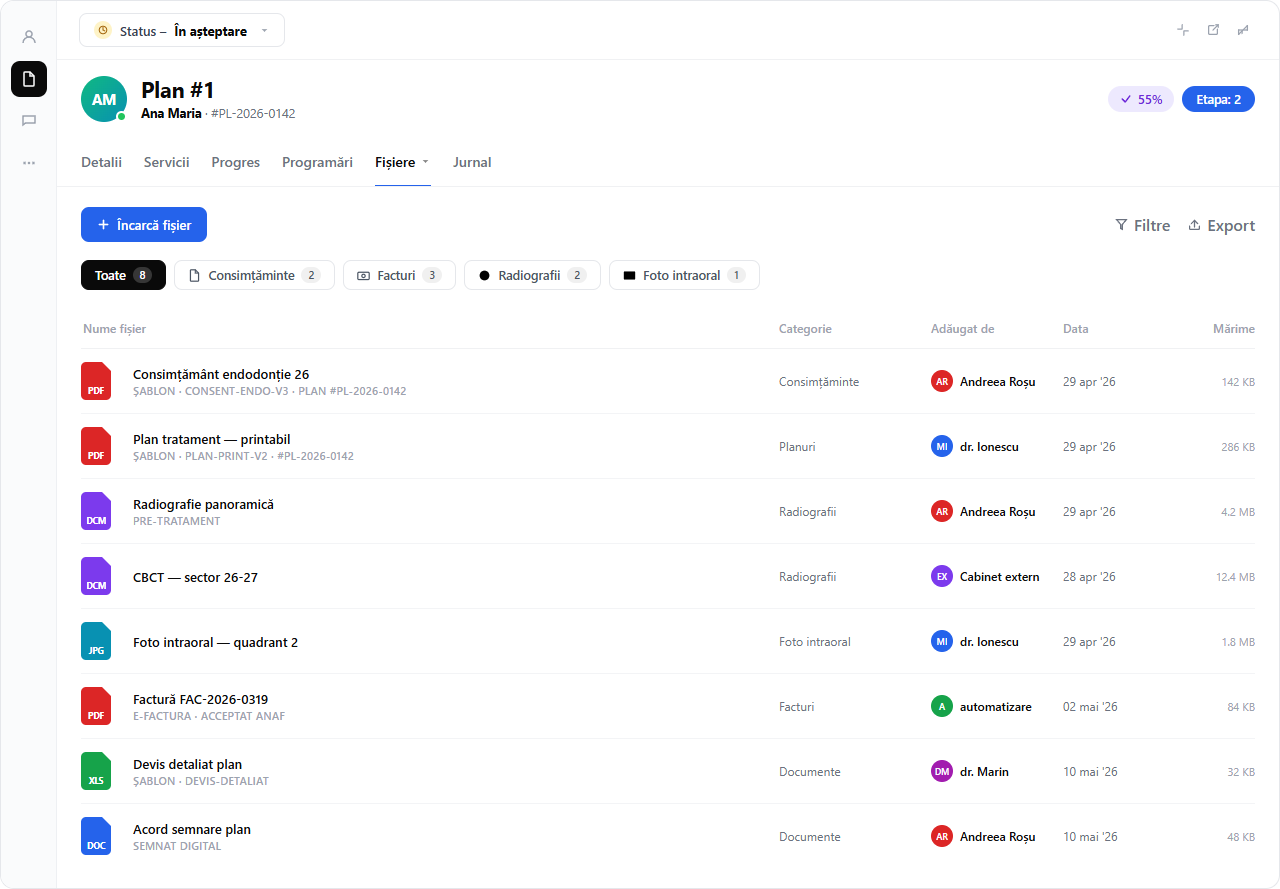
Consent forms, the printable plan, pre-treatment X-rays, invoices — each with author, date and quick actions. Generate from templates in one click.
AM
Plan #1
Ana Maria · #PL-2026-0142
55%
Stage: 2
Details
Services
Progress
Appointments
Files
Log
File name
Category
Date
Size
PDF
Endodontics consent 26Template · consent-endo-v3 · plan #PL-2026-0142
Consents
Apr 29 '26
142 KB
PDF
Treatment plan — printableTemplate · plan-print-v2 · #PL-2026-0142
Plans
Apr 29 '26
286 KB
DCM
Panoramic X-rayPre-treatment
X-rays
Apr 29 '26
4.2 MB
DCM
CBCT — sector 26-27
X-rays
Apr 28 '26
12.4 MB
JPG
Intraoral photo — quadrant 2
Intraoral photo
Apr 29 '26
1.8 MB
PDF
Invoice FAC-2026-0319e-Factura · accepted by ANAF
Invoices
May 02 '26
84 KB
XLS
Detailed plan estimateTemplate · devis-detaliat
Documents
May 10 '26
32 KB
DOC
Plan signing agreementdigitally signed
Documents
May 10 '26
48 KB
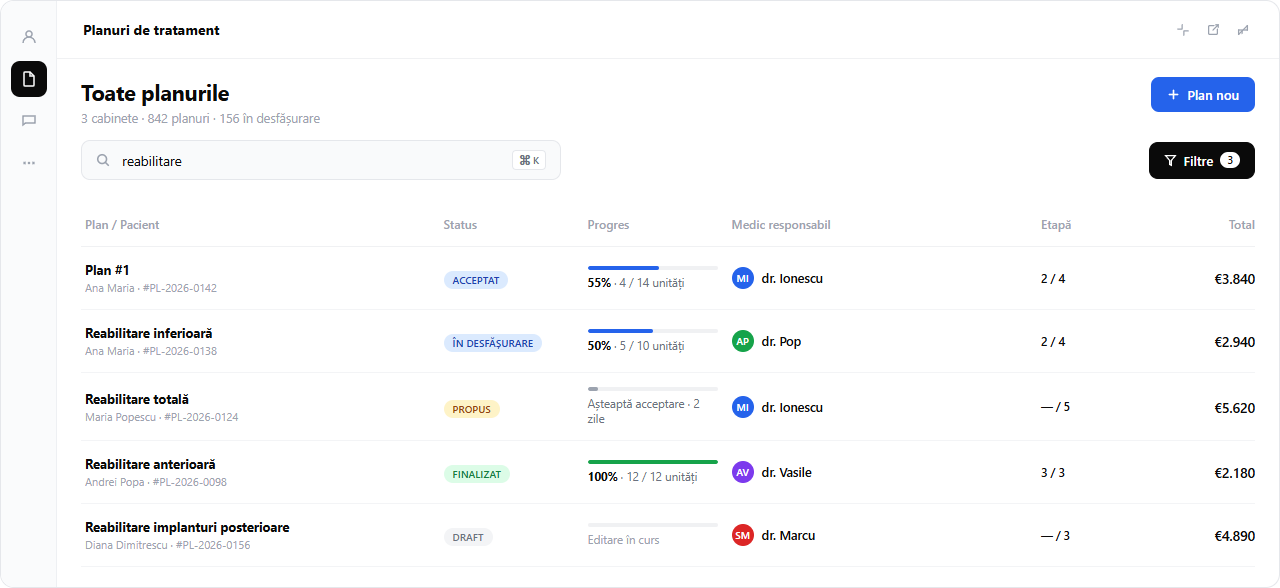
08 Search, reporting & audit log
Every plan in the clinic — searchable, filterable, auditable.
A cross-practice list of every plan, operational filters (active, proposed, blocked), plus a complete log of who changed what and when — no exceptions.
All plans
3 practices · 842 plans · 156 in progress
Plan / Patient
Status
Progress
Responsible doctor
Stage
Total
Plan #1Ana Maria · #PL-2026-0142
Accepted
55% · 4 / 14 units
MI
Dr. Ionescu
2 / 4
€3.840
Lower rehabilitationAna Maria · #PL-2026-0138
In progress
50% · 5 / 10 units
AP
Dr. Pop
2 / 4
€2.940
Full-mouth rehabilitationMaria Popescu · #PL-2026-0124
Proposed
Awaiting acceptance · 2 days
MI
Dr. Ionescu
— / 5
€5.620
Anterior rehabilitationAndrei Popa · #PL-2026-0098
Completed
100% · 12 / 12 units
AV
Dr. Vasile
3 / 3
€2.180
Posterior implant rehabilitationDiana Dimitrescu · #PL-2026-0156
Draft
Editing in progress
SM
Dr. Marcu
— / 3
€4.890
- Cross-practice search — patient, plan ID, doctor, status, date, progress range — all in a single list.
- Operational filters — “active”, “proposed”, “pending acceptance” — presets for day-to-day management.
- Core metrics — acceptance rate, average value, average time to completion per doctor and per discipline.
- Immutable audit — every change (status, price, item) is logged with author, timestamp and reason. Filterable. Exportable.
FAQ · TREATMENT PLANS MODULE
Questions about treatment plans
How many active plans can a patient have at the same time?
Just one. This rule prevents ambiguity: a single current active plan, while the rest stay proposed or archived. You can have any number of proposed plans, but only one accepted plan can be in progress at a time. For complex rehabilitations, we recommend using stages instead of multiple plans.
Can I change a plan after it has been accepted?
Yes, but with rules. Minor changes (notes, appointments, stages not yet started) don't require re-approval. Adding/removing services or changing dental units requires the patient's digital signature. Service prices can't be changed by hand — they always come from the catalog. Every change stays in the audit log.
How does per-service acceptance work?
The patient can accept the plan in full or service by service. If they choose selectively (e.g. accept the root canal but decline the crown), the plan moves to “partially accepted” status and a new “residual” plan is generated automatically for the declined services, which can be proposed again later.
Can one plan have several specialists (orthodontist + surgeon + prosthodontist)?
Yes. A plan can have specialists assigned for each discipline: orthodontist, general dentist, surgeon, prosthodontist, plus a plan manager. Each doctor sees only the services allocated to their discipline. The manager has full visibility and coordinates between stages.
How are discounts applied? Can I combine several?
Three levels of discount: per item (e.g. −10% on a crown), per stage, or on the whole plan (percentage or fixed amount). We also support vouchers/promo codes, with configurable stacking rules (stackable / exclusive / per category). All discounts appear transparently on the plan's printable statement.
How are warranties on dental work calculated?
Automatically, based on rules configured per type of work. For example: standard crown = 24 months, implant = 60 months, filling = 12 months. When a procedure is completed, the warranty is applied automatically and appears on the patient record. Reset on re-treatment and per-practice policies are configurable.
Can I export the plan as a PDF for the patient?
Yes, in one click. We generate a professional PDF with the clinic letterhead, patient details, a breakdown by stage and service, costs with and without discounts, plus space for a digital signature. The template can be customized per practice (logo, colors, legal terms).
How do I see the acceptance rate of my plans?
The Dashboards module includes predefined widgets for plans: acceptance rate per doctor, average plan value, average time from proposal to acceptance, stalled plans in progress, plans with outstanding balances. Filterable by practice, period and doctor.