
Answers to the most common questions about batches, packaging, transfers, orders and payments.
⚡Inventory & supply chain module
Your inventory, visible down to the last blister.
Stock across warehouses and practices, batches with expiry dates, partial PO receiving, transfers between locations, suppliers and payments — all on one screen, synced live.
8
sub-features
∞
warehouses & practices
Live
multi-warehouse
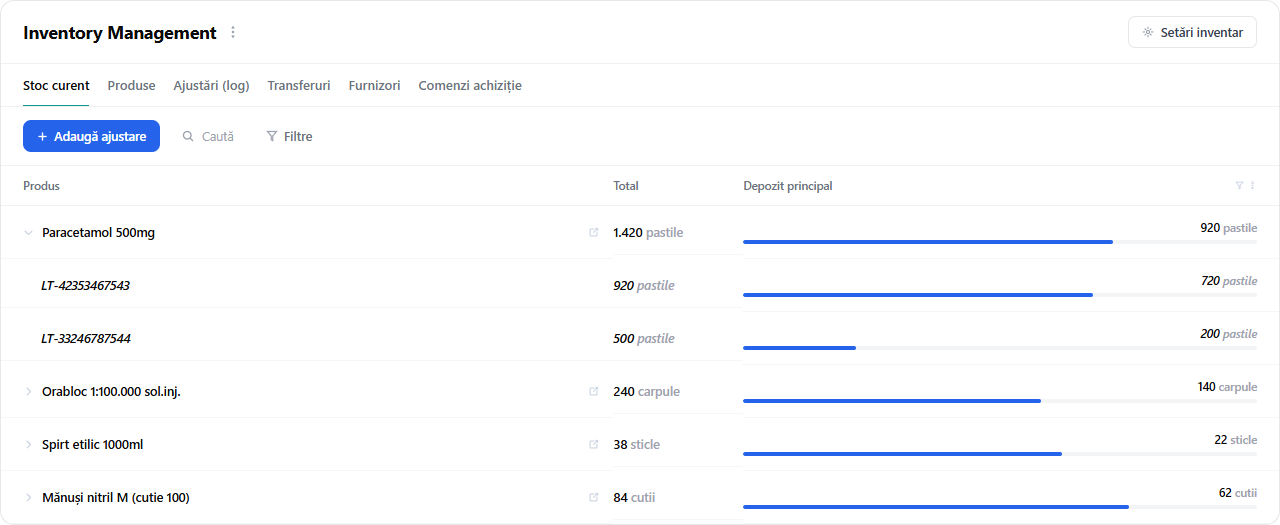
Inventory Management
Inventory settings
Current stock
Products
Adjustments (log)
Transfers
Suppliers
Purchase orders
01 Batches & expiry
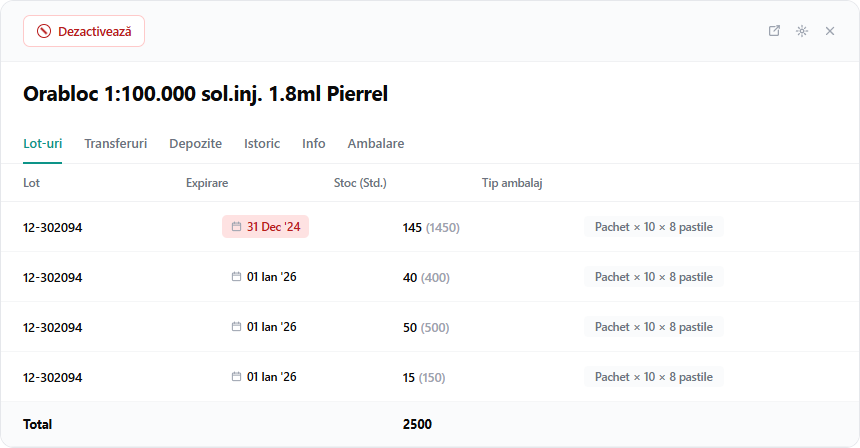
Every batch, tracked down to the last unit.
For every product you track received batches separately — with expiry date, supplier, remaining quantity and packaging type. Sortable, filterable, with a visual alert for those expiring soon.
Deactivate
Orabloc 1:100.000 sol. for inj. 1.8ml Pierrel
Lots
Transfers
Warehouses
History
Info
Packaging
Lot
Expiry
Stock (Std.)
Packaging type
12-302094
31 Dec '24
145 (1450)
Pack × 10 × 8 pills
12-302094
01 Jan '26
40 (400)
Pack × 10 × 8 pills
12-302094
01 Jan '26
50 (500)
Pack × 10 × 8 pills
12-302094
01 Jan '26
15 (150)
Pack × 10 × 8 pills
Total
2500
02 Packaging & units of measure
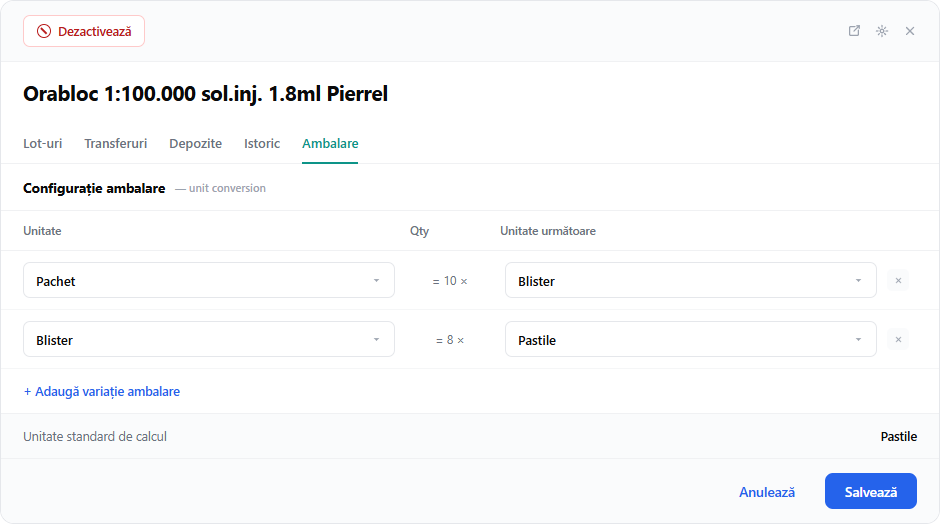
Pack → Blister → Tablets, with no conversion errors.
Define the product's packaging hierarchy once — the system converts between units automatically on every receipt, usage, transfer or adjustment. Stock in packs and stock in individual units always stay in sync.
Deactivate
Orabloc 1:100.000 sol. for inj. 1.8ml Pierrel
Lots Transfers Warehouses History Packaging
Packaging configuration — unit conversion
Unit
Qty
Next unit
Pack
= 10 ×
Blister
Blister
= 8 ×
Pills
+ Add packaging variant
Standard unit of measurePills
03 Warehouse distribution
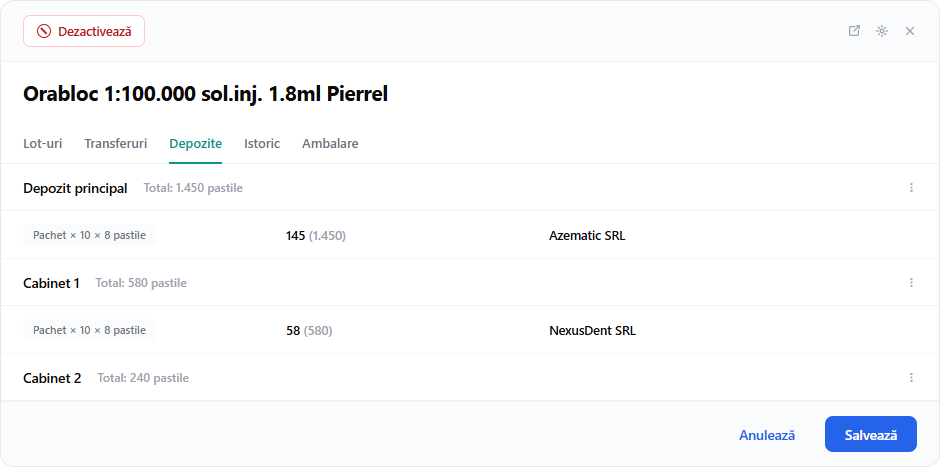
See instantly where every physical unit is.
The product sheet has a dedicated section showing stock split across the central warehouse, practices and sub-locations. Expand each location to see which batch is there, in what packaging and from which supplier.
Deactivate
Orabloc 1:100.000 sol. for inj. 1.8ml Pierrel
Lots Transfers Warehouses History Packaging
Main warehouse
Pack × 10 × 8 pills145 (1.450)Azematic SRL
Practice 1
Pack × 10 × 8 pills58 (580)DentumCloud SRL
Practice 2
04 Purchase orders (PO)
From placing the order to receiving and payment — on one screen.
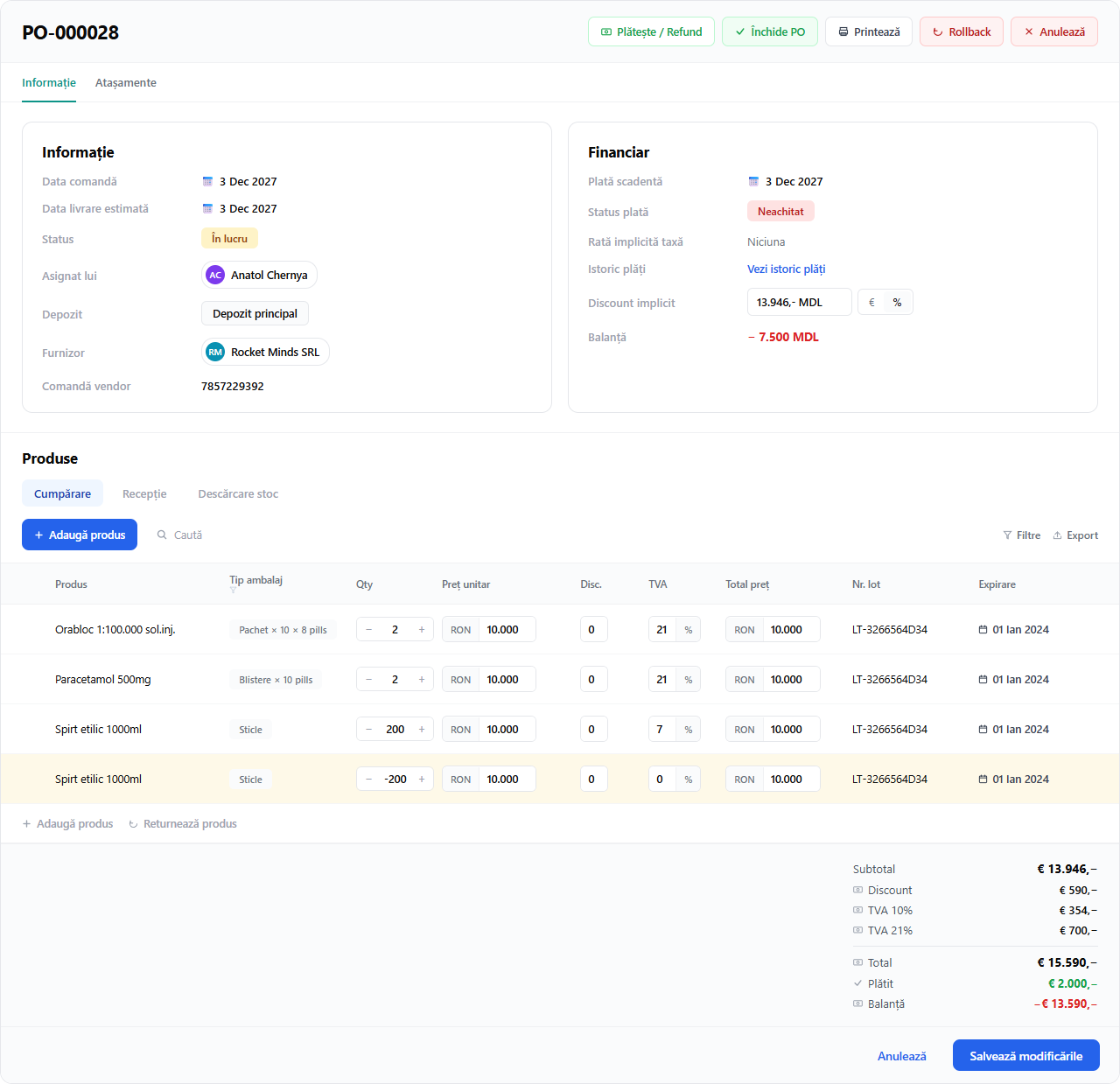
A PO has 3 steps in order: Purchase (quantities, price, tax, discount), Receiving (what actually arrived, possibly partial), Stock release (allocation to a practice). Payments can be partial, with full history.
PO-000028
Pay / Refund
Close PO
Print
Rollback
Cancel
Information
Attachments
Information
Order date
3 Dec 2027
Estimated delivery date
3 Dec 2027
Status
In progress
Assigned to
AC
Anatol Chernya
Warehouse
Main warehouse
Supplier
RM
Rocket Minds SRL
Vendor order
7857229392
Financial
Payment due
3 Dec 2027
Payment status
Unpaid
Default tax rate
None
Payment history
View payment history
Default discount
Balance
− 7.500 MDL
€
%
Products
1
Purchase
2
Front desk
3
Stock write-off
Product
Packaging type
Qty
Unit price
Disc.
VAT
Total price
Lot no.
Expiry
Pack × 10 × 8 pills
−
+
RON
%
RON
LT-3266564D34
Jan 01, 2024
Paracetamol 500mg
Blisters × 10 pills
−
+
RON
%
RON
LT-3266564D34
Jan 01, 2024
Ethyl alcohol 1000ml
Bottles
−
+
RON
%
RON
LT-3266564D34
Jan 01, 2024
Ethyl alcohol 1000ml
Bottles
−
+
RON
%
RON
LT-3266564D34
Jan 01, 2024
Add product
Return product
Subtotal
€ 13.946,−
Discount
€ 590,−
VAT 10%
€ 354,−
VAT 21%
€ 700,−
Total
€ 15.590,−
Paid
€ 2.000,−
Balance
−€ 13.590,−
05 Partial receiving & batches
Receive only what arrived — the rest stays open on the PO.
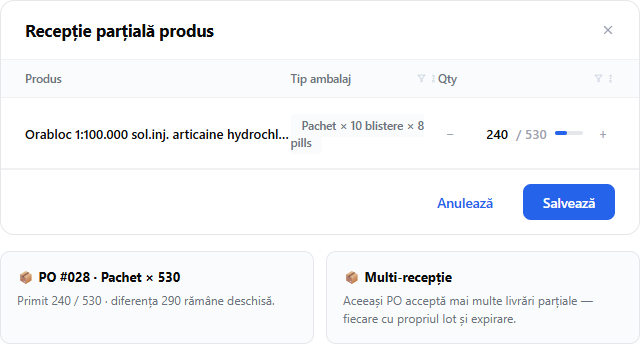
The supplier sent 240 of 530 packs? Mark a partial receipt with a slider. The rest stays “pending” and the PO doesn't close until everything is delivered (or you choose to force-close it).
Partial product receipt
Product
Packaging type
Qty
Pack × 10 blisters × 8 pills
−240 / 530+
📦 PO #028 · Pack × 530
Received 240 / 530 · the remaining 290 stays open.
📦 Multi-receipt
The same PO accepts multiple partial deliveries — each with its own lot and expiry.
06 Warehouse transfers
Move stock between warehouses, with history and audit.
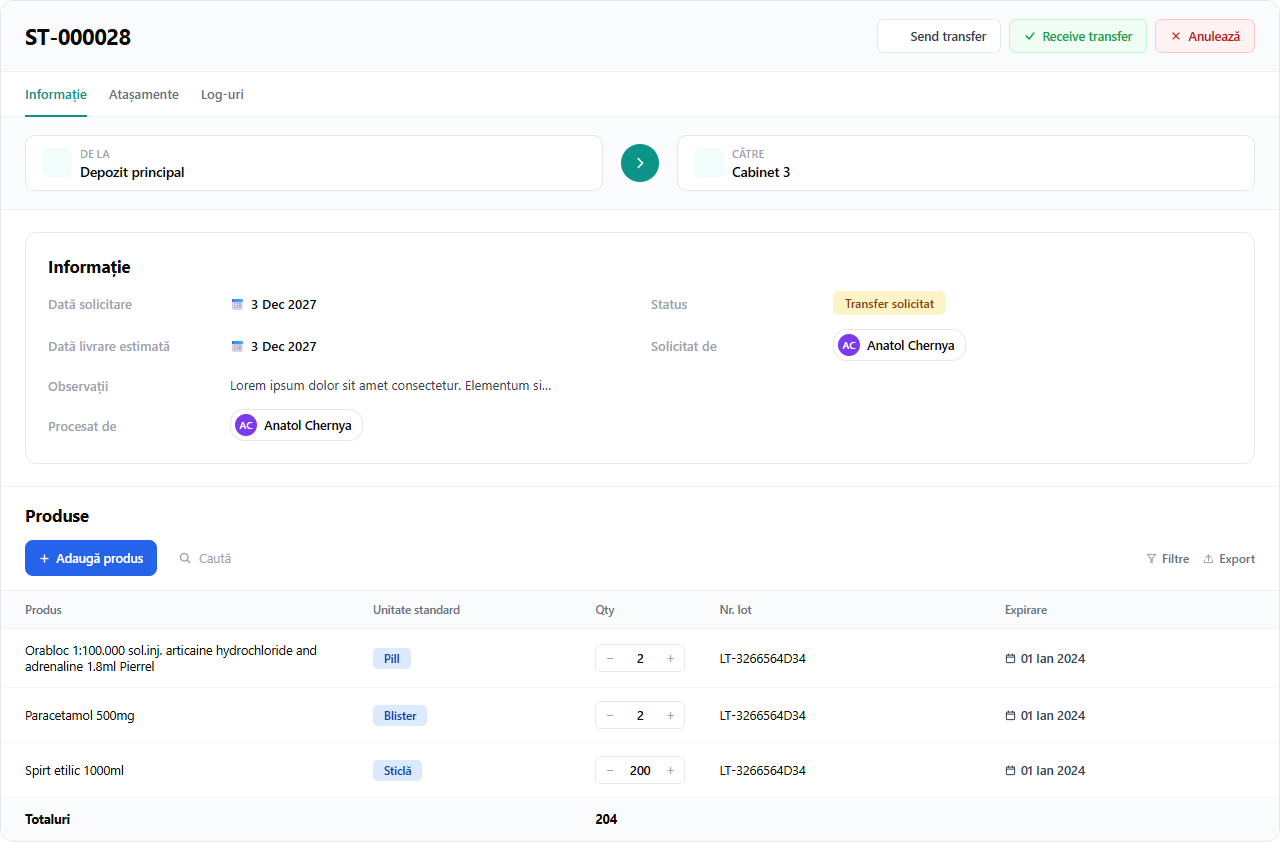
Request a transfer from practice 3 to the main warehouse and mark the products and batches being moved. The sender confirms “Send transfer”, the recipient confirms “Receive transfer”. Stock moves only after double validation.
ST-000028
Send transfer
Receive transfer
Cancel
Information
Attachments
Logs
FROMMain warehouse
TOPractice 3
Information
Request date
3 Dec 2027
Status
Transfer requested
Estimated delivery date
3 Dec 2027
Requested by
AC
Anatol Chernya
Notes
Lorem ipsum dolor sit amet consectetur. Elementum si…
Processed by
AC
Anatol Chernya
Products
Product
Standard unit
Qty
Lot no.
Expiry
Orabloc 1:100.000 sol. for inj. articaine hydrochloride and adrenaline 1.8ml Pierrel
Pill
−
+
LT-3266564D34
Jan 01, 2024
Paracetamol 500mg
Blister
−
+
LT-3266564D34
Jan 01, 2024
Ethyl alcohol 1000ml
Bottle
−
+
LT-3266564D34
Jan 01, 2024
Totals
204
07 Suppliers & order history
Supplier profile — legal, financial and order data.
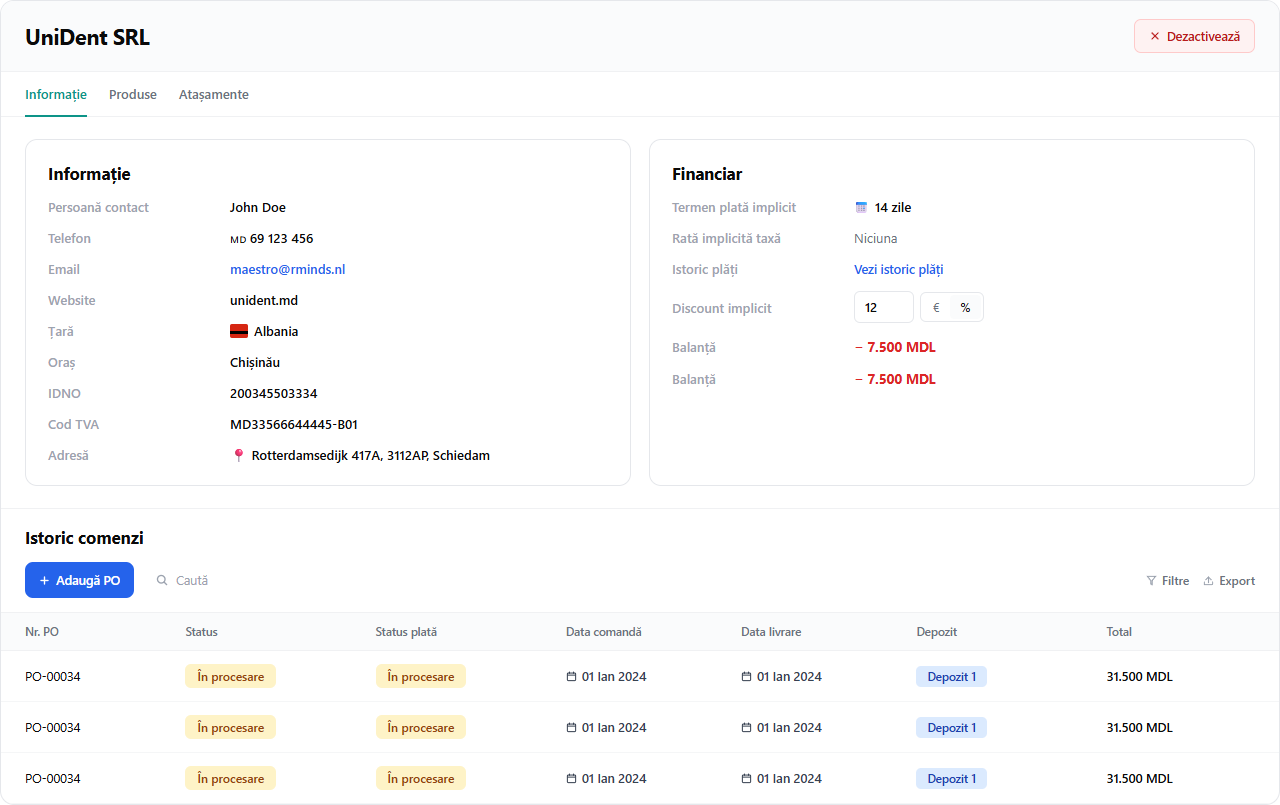
Contact, IDNO, VAT, address, default payment terms, negotiated discounts, balance and PO history. Everything you need for audits, accounting and negotiation.
UniDent SRL
Deactivate
Information
Products
Attachments
Information
Contact person
John Doe
Phone
🇲🇩 69 123 456
Email
maestro@rminds.nl
Website
unident.md
Country
Albania
City
Chișinău
IDNO
200345503334
VAT code
MD33566644445-B01
Address
📍 Rotterdamsedijk 417A, 3112AP, Schiedam
Financial
Default payment term
14 days
Default tax rate
None
Payment history
View payment history
Default discount
Balance
− 7.500 MDL
Balance
− 7.500 MDL
€
%
Order history
PO no.
Status
Payment status
Order date
Delivery date
Warehouse
Total
PO-00034
Processing
Processing
Jan 01, 2024
Jan 01, 2024
Warehouse 1
31.500 MDL
PO-00034
Processing
Processing
Jan 01, 2024
Jan 01, 2024
Warehouse 1
31.500 MDL
PO-00034
Processing
Processing
Jan 01, 2024
Jan 01, 2024
Warehouse 1
31.500 MDL
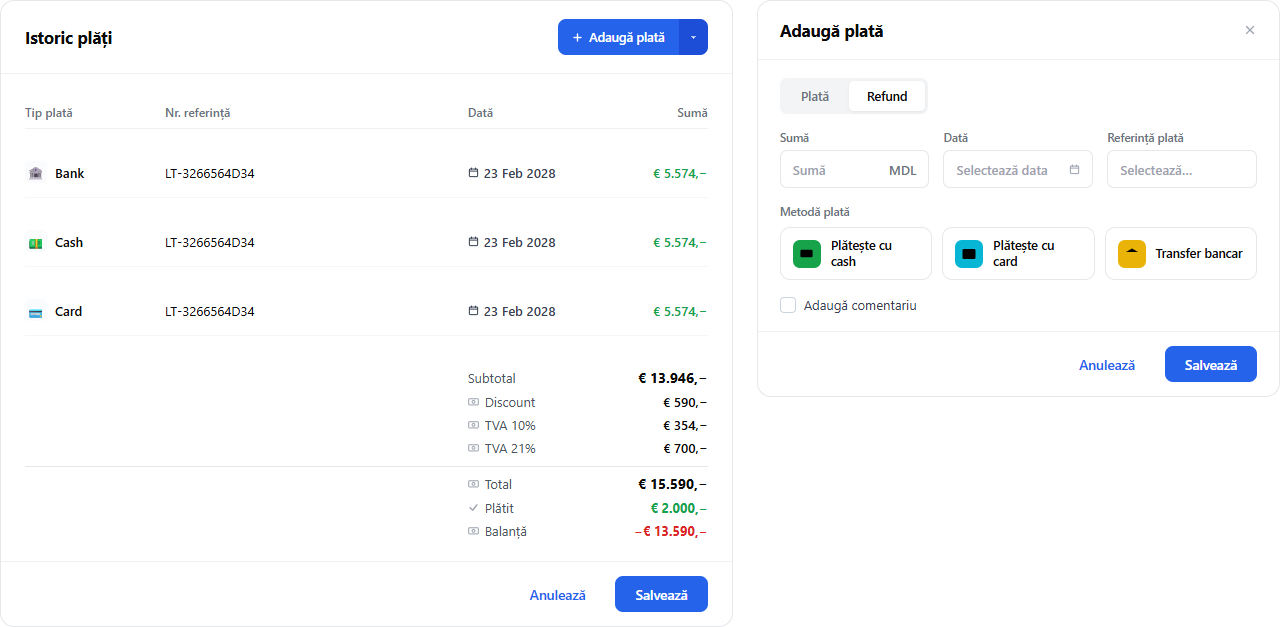
08 Payments & invoice history
Partial payments, refunds, proof — full history per PO.
On every PO you can record multiple payments (bank, cash, card) with amount, reference and attached proof. The system calculates the remaining balance automatically and marks the PO as paid only when the balance reaches zero.
Payment history
Add payment
Payment type
Reference no.
Date
Amount
🏦Bank
LT-3266564D34
23 Feb 2028
€ 5.574,−
💵Cash
LT-3266564D34
23 Feb 2028
€ 5.574,−
💳Card
LT-3266564D34
23 Feb 2028
€ 5.574,−
Subtotal
€ 13.946,−
Discount
€ 590,−
VAT 10%
€ 354,−
VAT 21%
€ 700,−
Total
€ 15.590,−
Paid
€ 2.000,−
Balance
−€ 13.590,−
Add payment
Payment
Refund
Amount
Amount
MDL
Date
Select date
Payment reference
Select…
Payment method
Pay in cash
Pay by card
Bank transfer
Add comment
FAQ · INVENTORY MODULE
Questions about inventory & orders
How do I manage batches and expiry?
Each batch has its own code, expiry date and stock. The system automatically highlights batches expiring in less than 90 days (yellow) or already expired (red) and lets you filter/sort by that dimension.
How does multi-unit packaging work?
Define the base unit (e.g. tablet, milliliter, gram) and the packaging levels above it — pack × box × pill. Conversions are automatic: if you receive 10 boxes, the stock in tablets updates correctly.
Can I keep the same product in multiple warehouses/practices?
Yes. Each product has separate stock per warehouse (main warehouse, Practice 1, Practice 2, …). Appointments automatically consume from the warehouse of the practice where the session was booked, with a configurable fallback.
How do purchase orders (PO) work?
Create a PO to the supplier and set the products, prices, VAT and delivery date. On receipt, you confirm the actual quantities (partial receiving supported), and stock updates with batch + expiry date per line.
Can I transfer stock between practices?
Yes. Create a transfer from Warehouse A → Warehouse B with product, batch and quantity. The system deducts stock at the source and adds it at the destination in the same transaction, with a full audit trail for compliance.
How do I manage suppliers and order history?
Each supplier has its own profile (contact details, commercial terms, payment terms) and the full history of received POs. Quickly see the total ordered value, payment balance and delivery performance.
Can I record partial payments to suppliers?
Yes. Payments can be cash, bank transfer or card. You can pay a PO partially (for example a 50% deposit, the rest on delivery) — the system calculates the remaining balance automatically and shows it on the supplier profile.
How do I get low-stock alerts?
Set a minimum threshold per product (e.g. 200 tablets of Paracetamol). When stock drops below it, you get an automatic notification and the system suggests generating a PO to your preferred supplier, prefilled with the recommended quantity.