
Answers to the most common questions about your team, scheduling, commissions and reporting.
⚡Module · Clinical
Your medical team,
measurable.
Doctor schedules, per-service KPI rules, paid commissions, real utilization rate and live activity — all in a single module that connects people to the revenue they generate.
8
sub-features
6
day types
∞
KPI rules
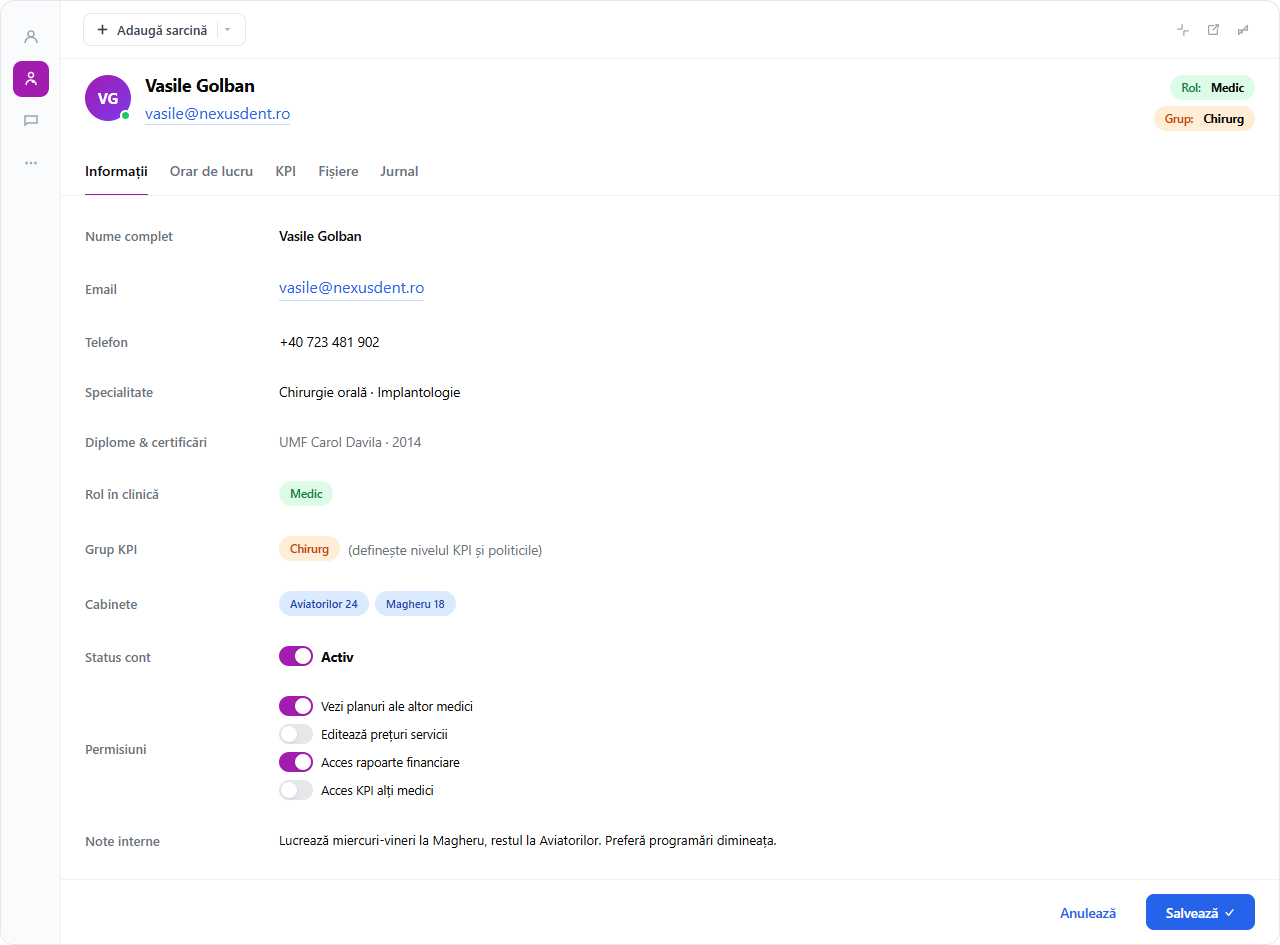
Information
Work schedule
KPI
Files
Log
Full name
Email
Phone
+40 723 481 902
Specialty
Oral surgery · Implantology
Diplomas & certifications
UMF Carol Davila · 2014
Role in clinic
Doctor
KPI group
Surgeon
(defines KPI level and policies)
Practices
Aviatorilor 24
Magheru 18
Account status
Active
Permissions
View other doctors' plans
Edit service prices
Access financial reports
Access other doctors' KPIs
Internal notes
Works Wednesday–Friday at Magheru, the rest at Aviatorilor. Prefers morning appointments.
01 Work schedule
Monthly view. Day types. Calendar validation.
Set working hours per day, multiple intervals, breaks, vacations and sick leave. The calendar enforces them automatically — no appointments outside working hours without an explicit override.
VG
Vasile Golban
Role:Doctor
Group:Surgeon
Occupancy
40,5%
KPI
€100
Appointments
4
Information
Work schedule
Files
Log
1
Mo
2
Tu
3
We
4
Thu
5
Fr
6
Sa
7
Su
Totals1.02 — 7.02
09:0018:00
09:0018:00
09:0018:00
09:0018:00
09:0014:00
8
appointments
41 h
8
Mo
9
Tu
10
We
11
Thu
12
Fr
13
Sa
14
Su
Totals8.02 — 14.02
09:0018:00
09:0018:00
09:0018:00
09:0018:00
09:0018:00
5
appointments
40 h
15
Mo
16
Tu
17
We
18
Thu
19
Fr
20
Sa
21
Su
Totals15.02 — 21.02
CM
Leave
medical
CM
Leave
medical
09:0018:00
CO
Leave
annual
CO
Leave
annual
3
appointments
9 h
22
Mo
23
Tu
24
We
25
Thu
26
Fr
27
Sa
28
Su
Totals22.02 — 28.02
09:0013:00
15:00—18:00
!
Absent
unexcused
09:0018:00
CP
Leave
paid
09:0018:00
6
appointments
25 h
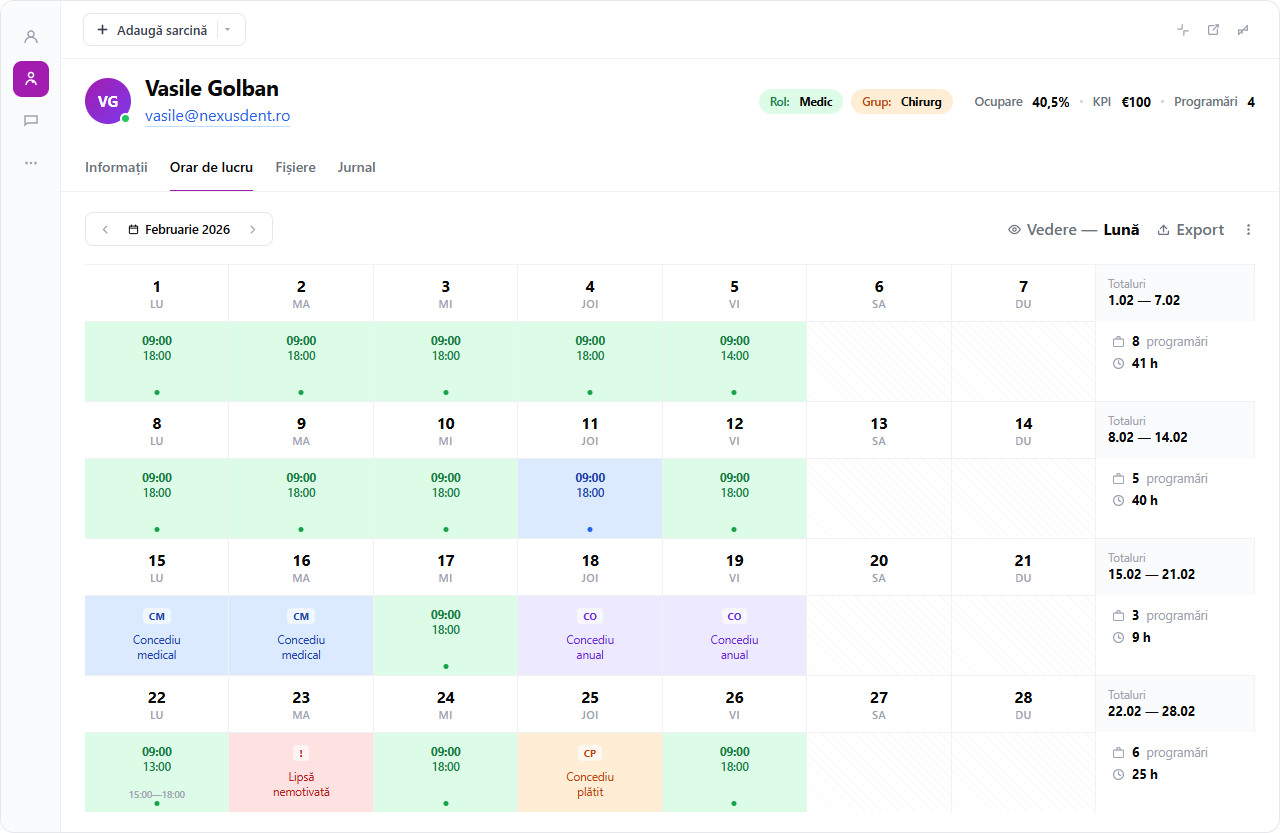
- Month / week view color-coded by day type: working day, vacation, absence, day off.
- Multiple intervals per day — a 09:00-13:00 morning shift + a 15:00-18:00 afternoon shift, with the break tracked separately.
- Weekly totals — number of appointments + hours worked, feeding the utilization rate.
- Click a day for details — see appointments, adjust the schedule ad hoc, change the day type.
02 Schedule & break setup
One template, week after week. With breaks, validity, practice.
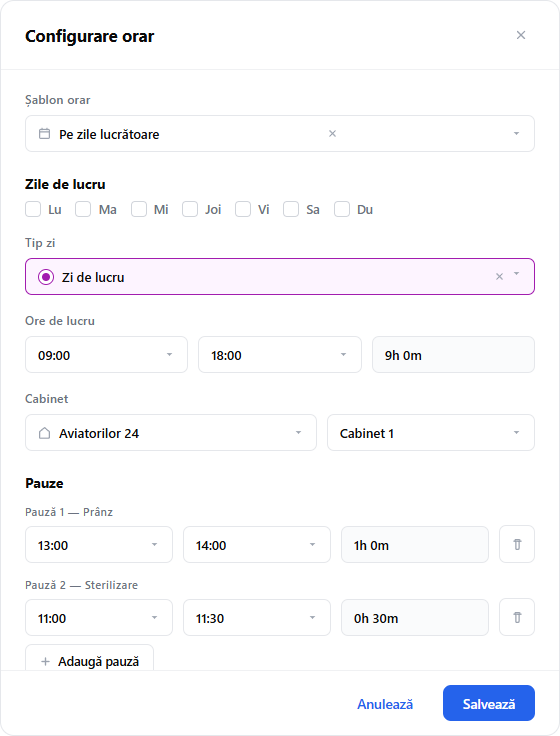
Define the weekly template once. The system applies it to any period you select (14 days, a month, a year), with multiple breaks and a validity range.
- Recurring templates — "Weekdays", "Even / odd week", "Custom schedule".
- Multiple breaks — add as many break intervals as you need (lunch, internal training, phone consultations).
- Open-ended or fixed validity — a schedule valid for 14 days, until a specific date, or "No end date" for permanent.
- Per practice — the same doctor can have a different schedule in each practice, with no conflicts.
Schedule setup
Schedule template
On working days
Working days
Mo
Tu
We
Thu
Fr
Sa
Su
Day type
Working day
Working hours
09:00
18:00
9h 0m
Practice
Aviatorilor 24
Practice 1
Breaks
Break 1 — Lunch
13:00
14:00
1h 0m
Break 2 — Sterilization
11:00
11:30
0h 30m
Add break
Validity
From / to interval
Today
23.06.2026
No end date
14 days
03 Individual KPI per service
Configurable KPI rules for every service, with time-based validity.
Set the commission per service — a percentage of revenue or a fixed amount. Rules with start/end dates, on/off toggle, grouped by service tree.
VG
Vasile Golban
Role:Doctor
Group:Surgeon
Occupancy
40,5%
KPI
€100
Appointments
4
Individual settings
Group settings
KPI results
KPI payments
Header
KPI
Type
Start date
End date
Therapy
Molar endodontics
600
MDL
Jan 01, 2024
No end
Endodontics incisor / canine / premolar
450
MDL
Jan 01, 2024
No end
Light-cured filling
12%
of value
Jan 01, 2024
No end
Professional scaling
25%
of value
Jan 01, 2024
Dec 31, 2025
Professional dental cleaning
200
MDL
Jun 01, 2024
No end
Surgery
Simple extraction
400
MDL
Jan 01, 2024
No end
Wisdom tooth extraction
800
MDL
Jan 01, 2024
No end
Single implant
20%
of value
Jan 01, 2024
No end
All-on-4 (full arch)
12.000
MDL
Feb 20, 2023
No end
Sinus lift
15%
of value
Apr 01, 2024
No end
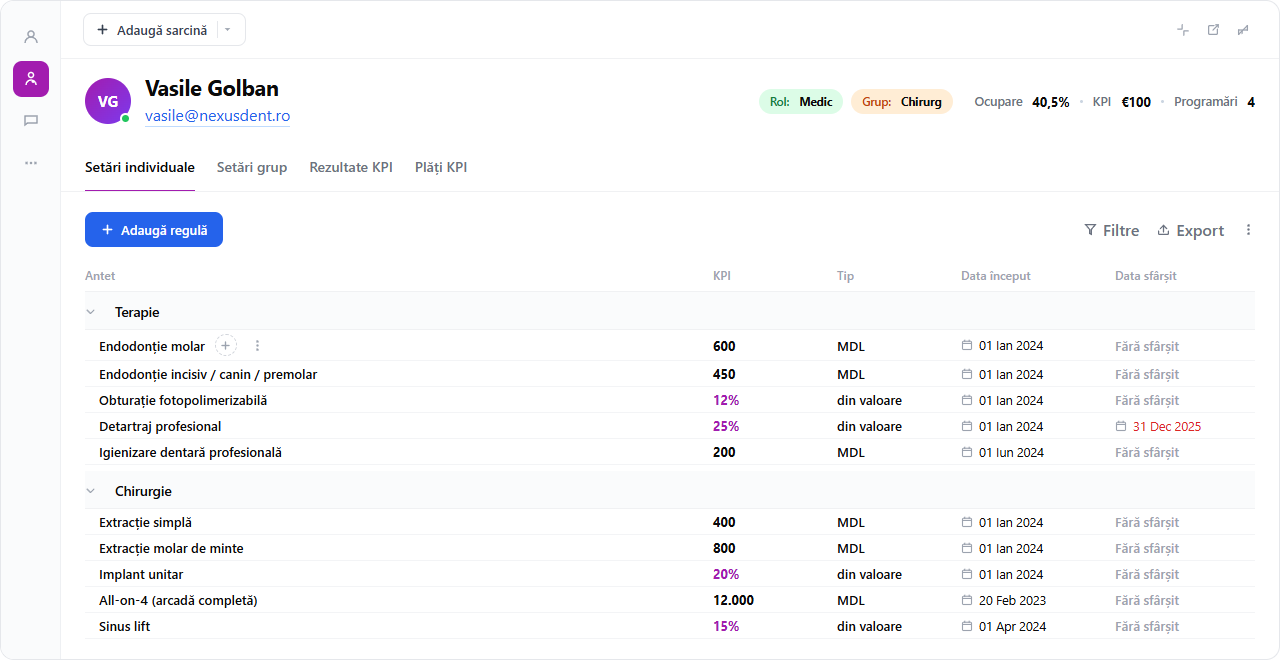
- 2 KPI types — percentage of revenue (e.g. 10% of the service value) or fixed amount (e.g. 1.800 MDL/case).
- Time-based validity — every rule has a start/end date. When it changes, KPI history is preserved automatically.
- Parallel versions — keep several versions side by side (e.g. 10% in 2025, 9% in 2024 expired).
- Quick on/off toggle — temporarily disable a rule without deleting it. Expired dates are highlighted in red.
04 KPI results & payouts
From rule, to number, to payroll.
Instantly see the monthly accrued KPI, broken down by service and by patient. Mark amounts as paid, generate a report for accounting, keep the full history.
Individual settings
Group settings
KPI results
KPI payments
Current month KPI
€2.840
Paid this month
€1.420
Payment pending
€1.420
Services performed
38
Date performed
Service
Patient
KPI
Rule applied
Payment status
May 14 · 14:30
Implant + extraction (all-on-4)
MC
Maria C.
€420
Level 3 (Surgeons)
Pending
May 12 · 11:00
Endodontic retreatment
DD
Diana D.
€180
10% of revenue
Pending
May 08 · 10:00
Standard crown on implant ×2
AP
Andrei P.
€240
€240 flat/case
Paid
May 05 · 16:00
Molar 26 extraction
MR
Maria R.
€85
Level 2 (Surgeons)
Paid
May 02 · 09:30
All-on-8 bundle
EV
Elena V.
€1.250
Fixed amount/case
Paid
May 01 · 14:00
Consultation + X-ray
CD
Cristian D.
€32
Level 1 (Surgeons)
Blocked
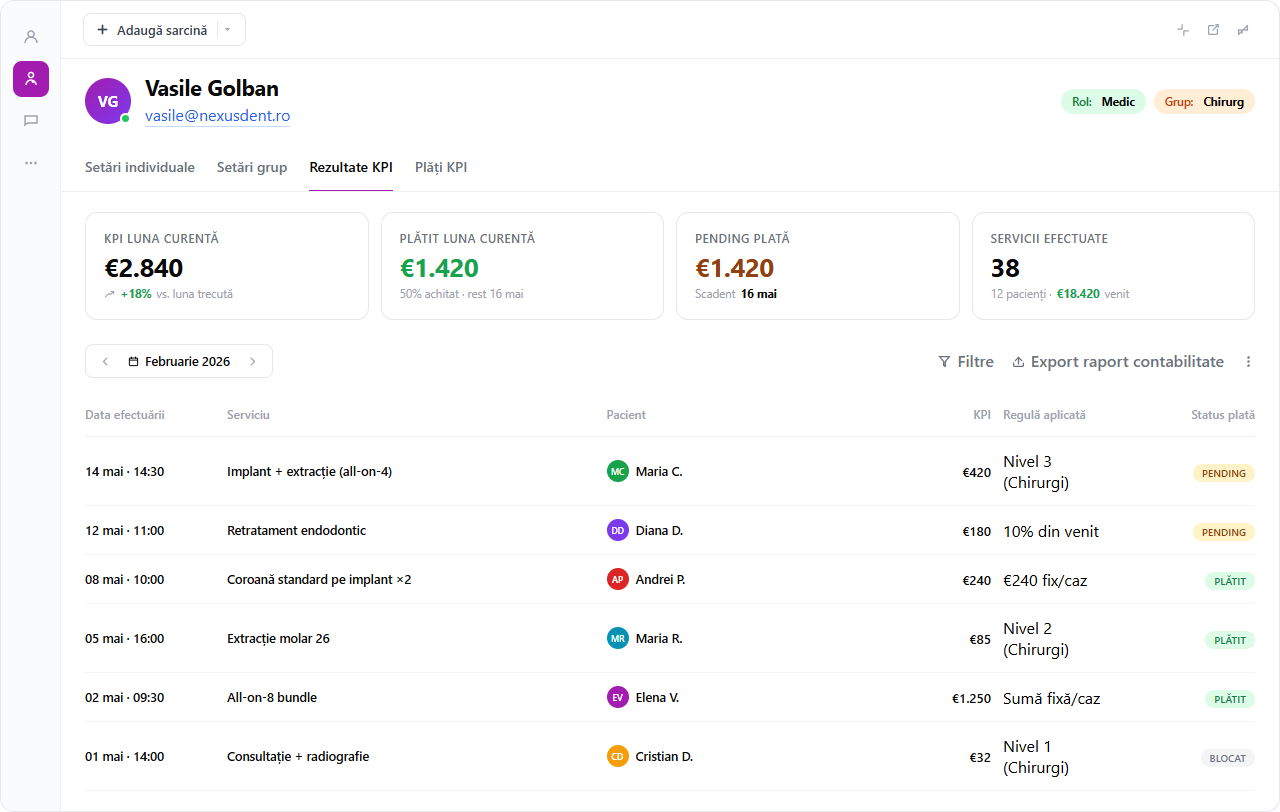
- Real-time accrual — every time an appointment is completed, the KPI is calculated and added automatically to the pending payout list.
- Accounting report export — generate Excel/CSV with the monthly KPI breakdown per doctor for payroll.
- Payout status — Paid / Pending / Blocked (for example, when the patient's invoice hasn't been collected yet).
- Historical comparison — see current vs. previous month, 12-month trend, distribution by service.
05 Activity monitor
Who, what, when. Your team on the radar — in real time.
Instantly see who's online, what task they're working on, how many hours they've logged today vs. yesterday vs. this week. Built for managing large teams and multi-location practices.
Activity monitor
Sort
View
Today
This week
This month
Team member
Active schedule
Appointment duration
Occupancy (sched. / active)
Actual duration (done / sched.)
MI
Dr. Ionescu Maria
87%
busy
96%
completed
AP
Dr. Pop Andreea
72%
busy
108%
completed
AV
Dr. Vasile Andrei
59%
busy
91%
completed
SM
Dr. Marcu Sergiu
41%
busy
102%
completed
DM
Dr. Marin Diana
94%
busy
95%
completed
+ Add new member
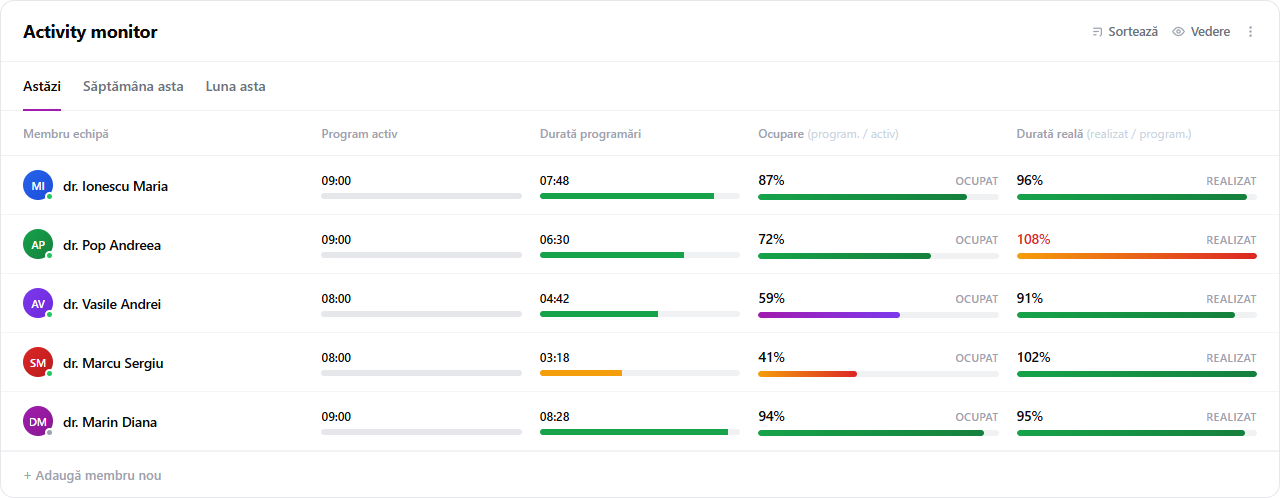
- Period switch — the Today, This week, This month tabs recalculate all 4 indicators for the selected period.
- Utilization = Appointment time ÷ Active schedule — green > 70%, purple 50–70%, amber < 50%. Underutilized doctors are easy to spot.
- Actual duration ÷ Scheduled duration — measures schedule discipline. >100% is red (slot overrun), <85% indicates unused time.
- Timesheet export — download aggregated data for payroll or HR reporting.
FAQ · DOCTORS, KPIs & UTILIZATION MODULE
Questions about doctors, KPIs and utilization
Can I have different KPI rules per practice?
Yes. Each doctor can have a different set of KPI rules per practice — for example, 15% at Aviatorilor and 12% at Magheru. Whenever an appointment is completed, the system picks the right rule based on the practice where it took place.
How is the KPI calculated when a discount is applied?
Configurable per rule. Two options: (1) KPI calculated from the discounted price (the doctor "absorbs" the discount), or (2) KPI calculated from the list price (the doctor isn't affected by the discount — the clinic absorbs it). Plus a mixed option with a configurable split.
Can I export hours worked for timesheets or payroll?
Yes. CSV/Excel export broken down per doctor, per day: scheduled hours, hours actually worked (from check-in to appointment completion), breaks, the type of each day (working / vacation / absence). Compatible with most payroll software used in Romania and Moldova.
What happens to existing appointments if I mark a day as "sick leave"?
The system shows the list of affected appointments and gives you two options: (1) automatically reassign them to other available doctors with the same skills, or (2) cancel them with an automatic patient notification (SMS/WhatsApp) and a rescheduling suggestion. Nothing happens without your confirmation.
How is the utilization rate calculated?
Utilization rate = (actual scheduled time ÷ available working time) × 100. "Actual scheduled time" is the sum of the durations of confirmed/completed appointments. "Available time" excludes breaks, vacations and blocked slots. See the rate by day / week / month, with history and trend.
Can I see other doctors' KPIs or only my own?
Configurable through permissions. By default, each doctor sees only their own KPI. Clinic managers and administrators see the whole team's KPIs. The "Access other doctors' KPIs" permission can be enabled individually or per group.
Does Activity monitor use the camera or track keystrokes?
No. Activity monitor only tracks interactions with DentumCloud: which page is open, which field is being edited, when the last action occurred. It doesn't access the camera, microphone, keyboard or other apps. All data stays in your system, in line with GDPR.
Can I set up a bonus for the front desk (not just doctors)?
Yes. The group KPI module supports any role — front desk, assistants, managers. Typically, the front desk earns a bonus based on lead conversion rate or the total value of confirmed appointments. You set up your own tiers, separate from those for doctors.