
Leads converted. Systematically.
Funnels configurable per discipline, deals backed by the patient's full history, automations on every stage transition and omnichannel communication right from the card. Your CRM, built for dental clinics.
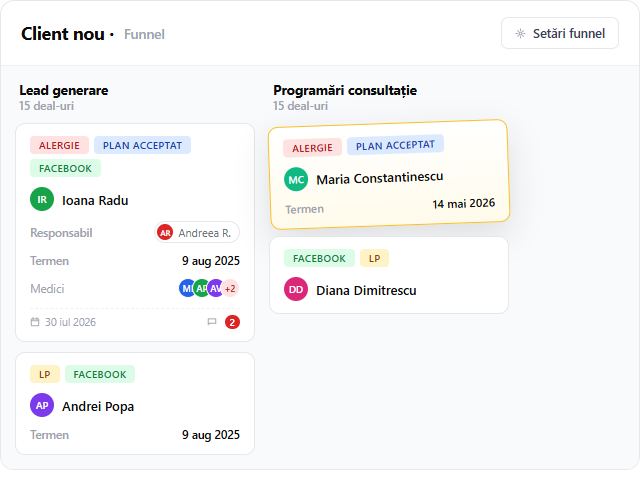
As many funnels as you need. As many stages as you need.
Funnels grouped by discipline (Therapy / Surgery / Orthodontics) or by sales flow (Lead generation → New client → Treatment plan). Each with its own stages, rules and automations.
⋮⋮
⋮⋮
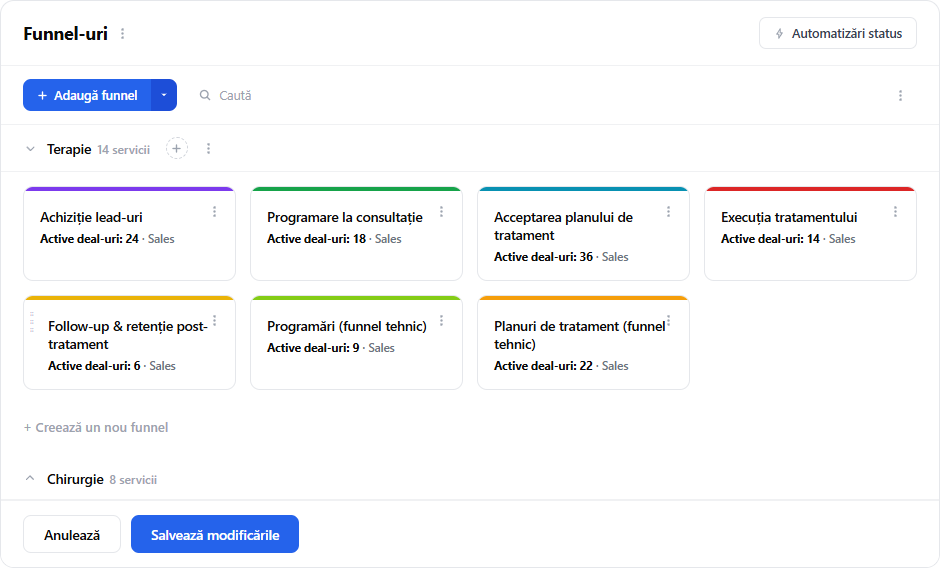
- Funnels by category — group by discipline or by sales stage. Drag & drop to reorganize.
- Funnel templates — start from templates (Lead → Client → Plan) or build from scratch.
- Active deals shown on every card for an instant view of the workload.
- Color stripes per funnel for quick identification in Kanban boards and lists.
Visual deals. Drag & drop. Subtasks on the spot.
Every deal is a card with everything that matters: colored tags, patient, owners, deadline, assigned doctors, message counters. Subtasks right on the card. Move between stages with drag & drop.
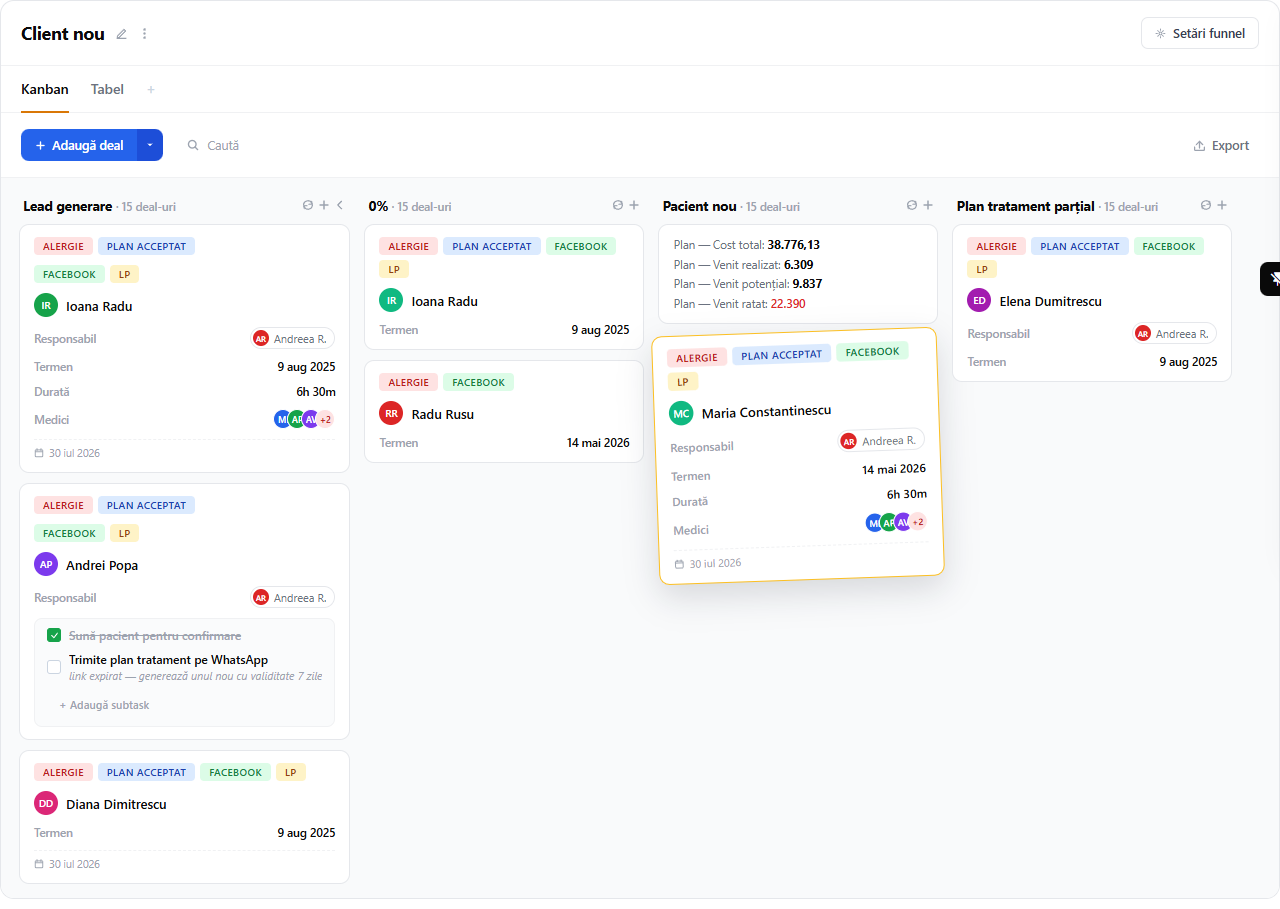
- Drag & drop between stages with validations (required fields, transition reason).
- Stats per stage — total cost, realized revenue, potential and lost — at a glance.
- Subtasks on the card — check them off right from the Kanban, without opening the deal.
- Quick-create right from the stage with “+", without switching context.
Three columns. Everything about the patient, plan and communication.
Patient on the left · appointments, treatment plans and tasks in the center · live log of calls, messages and notes on the right. All on one screen — no tab switching.
How much is a dental cleaning at your clinic?
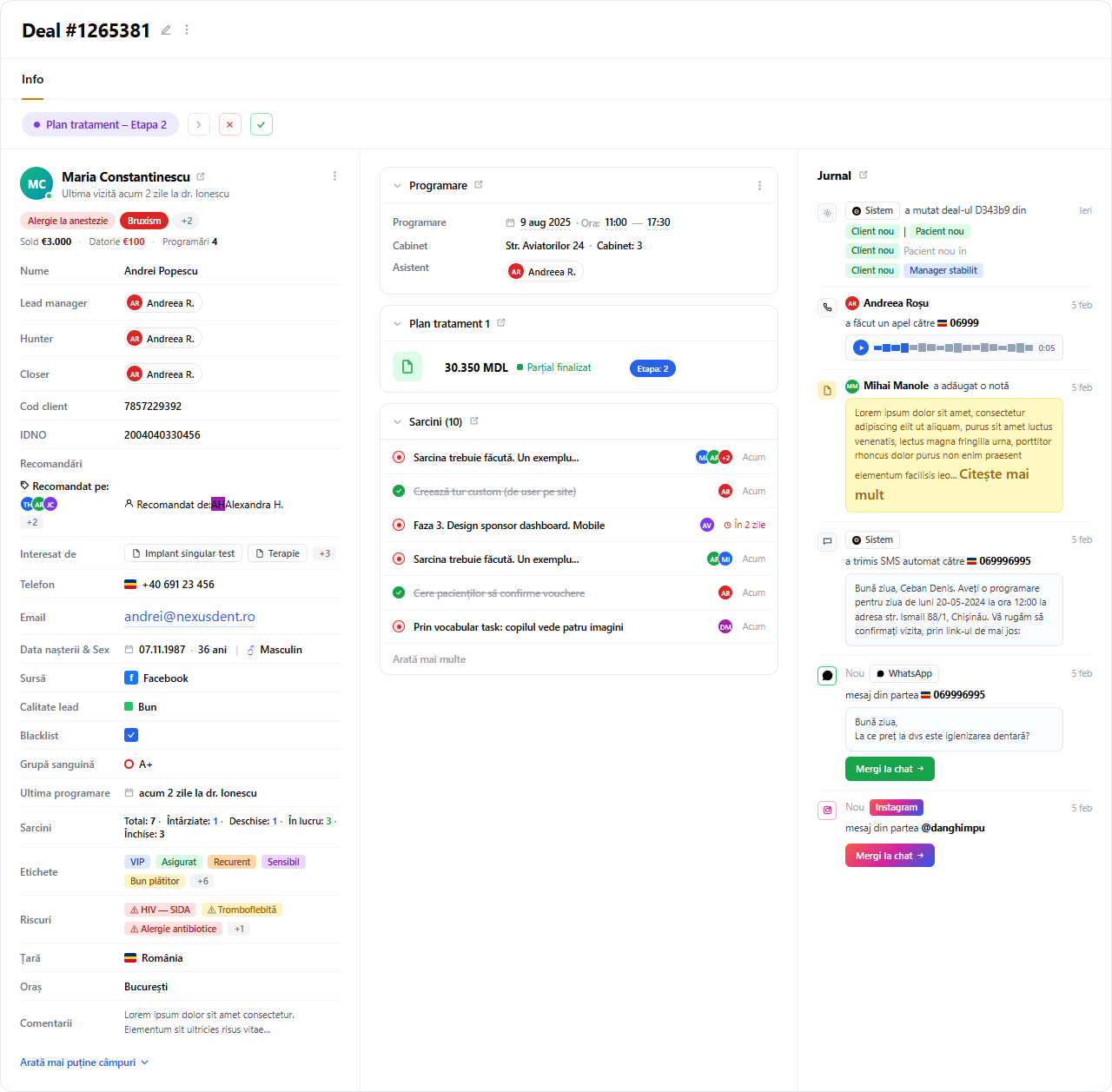
- Status pill with shortcut — one click on × or ✓ moves the deal to “lost" or “won" with a documented reason.
- Linked patient with history, risks, balance and tags — all visible without switching tabs.
- Treatment plans built in right into the deal — see stages, progress and the dental chart.
- Omnichannel log — calls, SMS, WhatsApp, Instagram, manual notes — all in chronological order.
Stages are more than columns. They're policies.
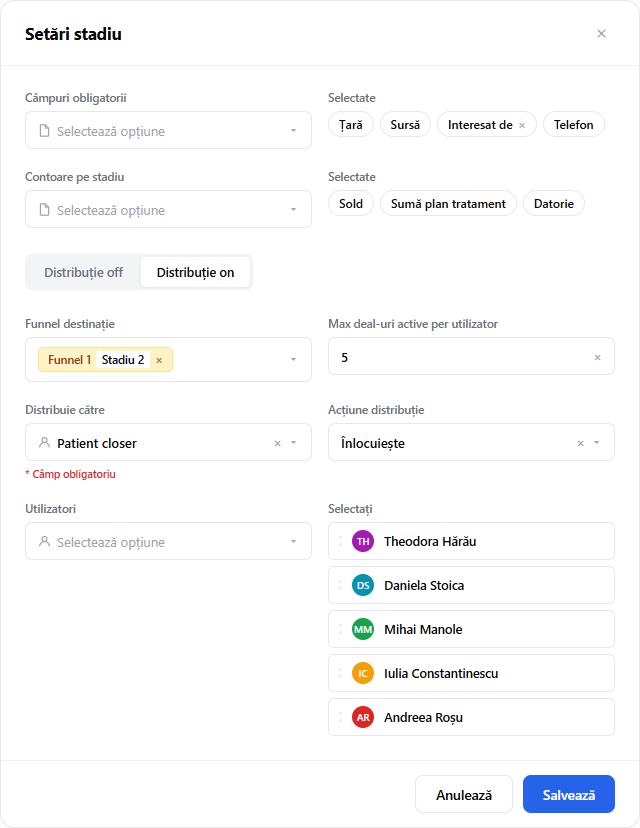
Required fields on stage entry, financial counters per stage, automatic lead distribution among reps with an active-deal limit per user, and replace / add actions.
- Required fields — you can't enter a stage without Country, Source, Phone. The system stops you first.
- Per-stage counters — Balance / Plan amount / Debt aggregated per column for an instant overview.
- Round-robin distribution — new leads are split automatically among closers (max N active per user).
- Replace / Add mode — either overwrite the previous owner or add them as co-owner.
⋮⋮THTheodora Hărău
⋮⋮DSDaniela Stoica
⋮⋮MMMihai Manole
⋮⋮ICIulia Constantinescu
⋮⋮ARAndreea Roșu
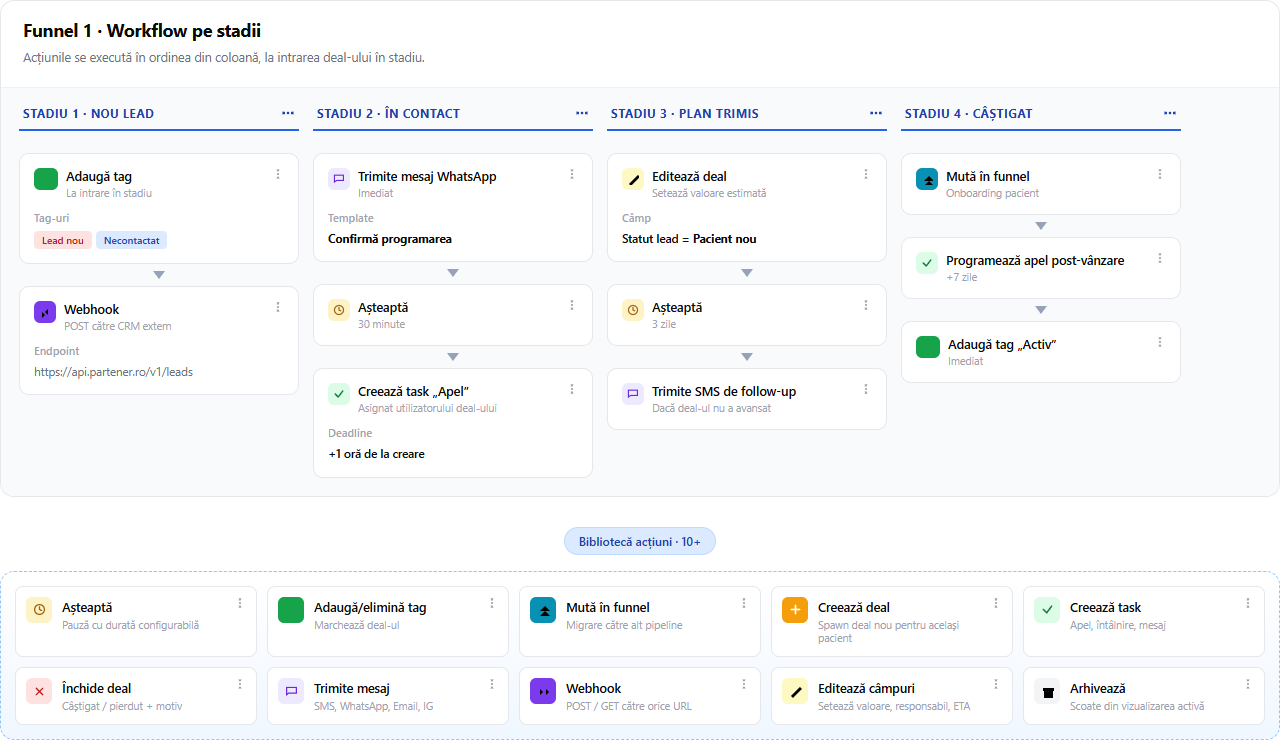
Visual workflow builder — no code, no headaches.
Every stage can trigger a sequence of actions. Drag them from the library, chain them, save — and they take effect immediately for every deal entering that stage.
Funnel 1 · Stage workflow
Actions run in column order when the deal enters the stage.
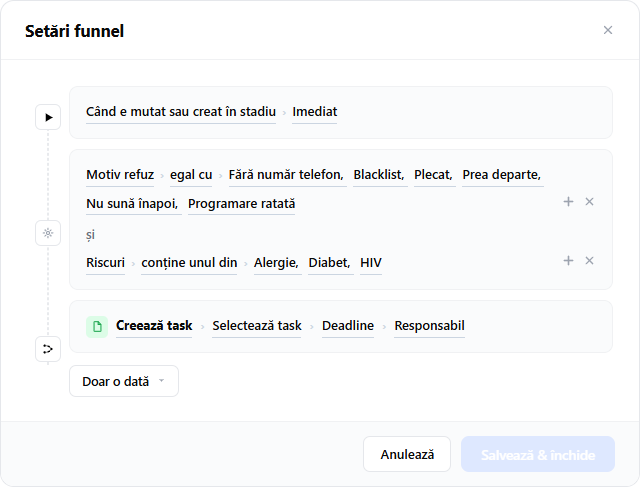
Branching decisions, as a tree — “if A, then B, else C”.
Funnel settings let you build a condition tree: based on a rejection reason, risks flagged on the patient, or a field value, automation paths branch out. Combined with stage workflows, it becomes a mini business-rules engine.
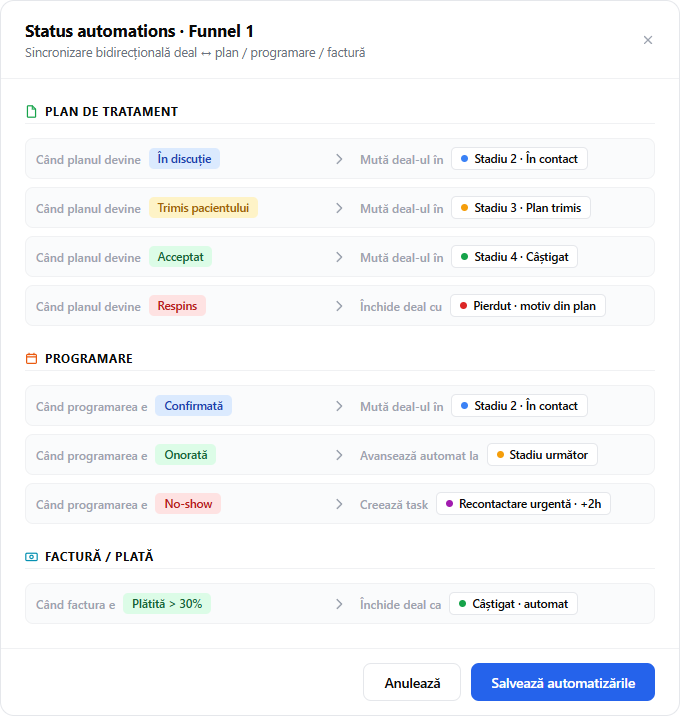
The CRM “senses” what the clinical team does — no double entry.
When a treatment plan is marked “Accepted”, when an appointment is confirmed or canceled, when an invoice is paid — the matching deal changes stage automatically. Configurable per funnel.
SMS, WhatsApp, Email, Instagram, phone — all with history, in one place.
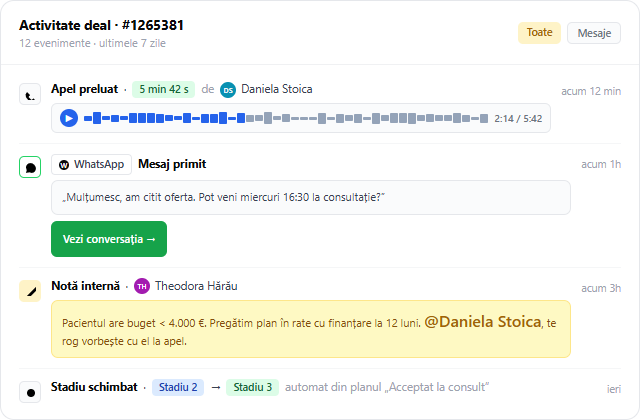
The deal feed keeps every interaction in chronological order: recorded calls, messages linking to the full conversation, internal notes, stage changes and system actions. The closer sees the full context in 5 seconds.
Questions about funnels & pipeline
Answers to the most common questions about funnels, deals, automations and omnichannel communication.
Unlimited. We recommend separating by business stage (Lead → Appointment → Plan acceptance → Execution → Follow-up) plus technical funnels (Appointments, Treatment plans) that are populated automatically from the Calendar and Plans modules.
Both ways. When the front desk marks an appointment as "Confirmed", the matching deal jumps automatically to the mapped funnel stage. Conversely, if you manually move the card on the Kanban to a "Declined" stage, the plan/appointment immediately reflects the same state — no more updating in two places.
WhatsApp / SMS sending on stage entry, automatic task creation for the deal owner, conditional tagging, webhooks to external CRMs, field editing (status, value, owner) and moving to another funnel. All triggers can be combined with conditions (e.g. "only if the deal has the VIP tag").
Calls, SMS, WhatsApp, Instagram, Telegram and Viber are logged chronologically right on the deal — with call recording, transcript and response time. You reply from the card without switching tabs, and the message reaches the patient on their preferred channel (or the last one used).
Yes. Add custom fields (lead source, insurance, preferred doctor, stated budget, qualification score) and use them in filters, in the Kanban view, as automation triggers or as scoring rules. Fields can be made required when moving into a specific stage.
Yes. Native connectors for Facebook Lead Ads, Google Lead Forms, Tally and your website forms create deals automatically in the "Lead acquisition" funnel. The lead source is recorded as a tag for per-channel ROI reporting.
Conversion rate per stage, time-in-stage, active pipeline value, lost value (by reason), the owner with the most closed deals — all live in the Sales dashboard. Comparable month over month and by doctor / owner.
Define inactivity policies per stage (e.g. "if the lead doesn't reply within 3 days, send a WhatsApp reminder; if there's still no reply after 7 days, move to the Declined stage and send a retention message"). All changes are logged in the deal log for auditing.