Answers to the most common questions about SSO, 2FA, RBAC, sessions and the audit log.
⚡SSO · 2FA · RBAC · Audit
Patient data, as secure as a bank.
Single sign-on with Google/Microsoft/Okta/SAML, two-factor authentication, password policies, corporate domain restriction, granular roles and an immutable audit log. GDPR compliance by design.
7
sub-features
SAML
enterprise SSO
GDPR
immutable audit
User management
Users
Teams
Roles
Permissions
Security policies
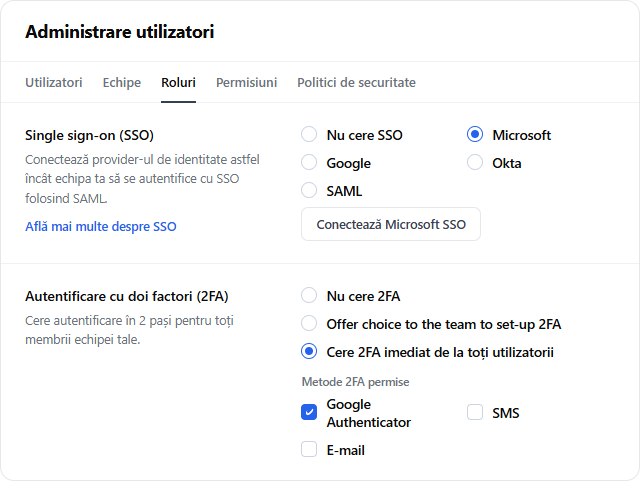
Single sign-on (SSO)
Connect your identity provider so your team can sign in with SSO using SAML.
Learn more about SSO
Don't require SSO
Microsoft
Google
Okta
SAML
Two-factor authentication (2FA)
Require two-step authentication for all your team members.
Don't require 2FA
Offer choice to the team to set-up 2FA
Require 2FA from all users immediately
Allowed 2FA methods
Google Authenticator
SMS
Email
01 Single sign-on (SSO)
One account, everywhere. Controlled provisioning.
Connect your identity provider (Google Workspace, Microsoft 365, Okta or any SAML 2.0) and your team signs in with their corporate credentials. Automatic de-provisioning when a user is deactivated in the IdP.
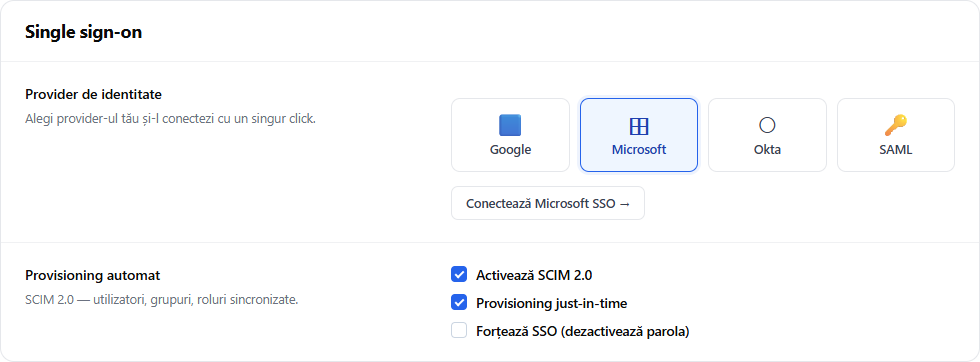
Single sign-on
Identity provider
Pick your provider and connect it in one click.
🟦Google
⊞Microsoft
○Okta
🔑SAML
Automatic provisioning
SCIM 2.0 — users, groups, roles synced.
Enable SCIM 2.0
Just-in-time provisioning
Enforce SSO (disable password)
02 Two-factor authentication
A compromised password is no longer a disaster.
Make 2FA optional, mandatory for all staff, or required only for sensitive roles (admin, finance). Choose the accepted methods — Google Authenticator (TOTP), SMS, Email — based on your risk profile.
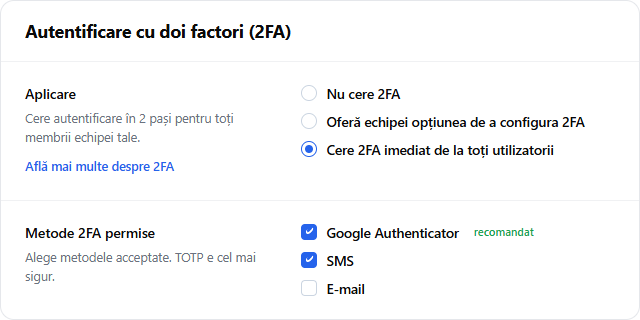
Two-factor authentication (2FA)
Don't require 2FA
Offer the team the option to set up 2FA
Require 2FA from all users immediately
Allowed 2FA methods
Choose the accepted methods. TOTP is the most secure.
Google Authenticator recommended SMS Email
03 Password & domain policies
Strict rules, configured once.
Restrict who can sign up by email domain, enforce password length and complexity, require periodic resets. All applied globally, with no bypass.
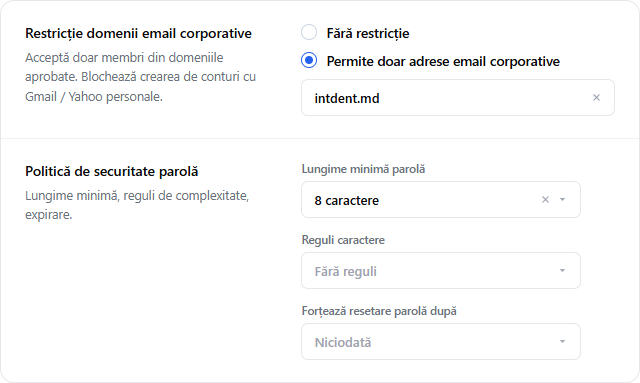
Corporate email domain restriction
Only accept members from approved domains. Block account creation with personal Gmail / Yahoo.
No restriction
Allow only corporate email addresses
intdent.md
Password security policy
Minimum length, complexity rules, expiration.
Minimum password length
8 characters
Character rules
No rules
Force password reset after
Never
04 Roles & permissions (RBAC)
Who sees what. Granular down to the individual field.
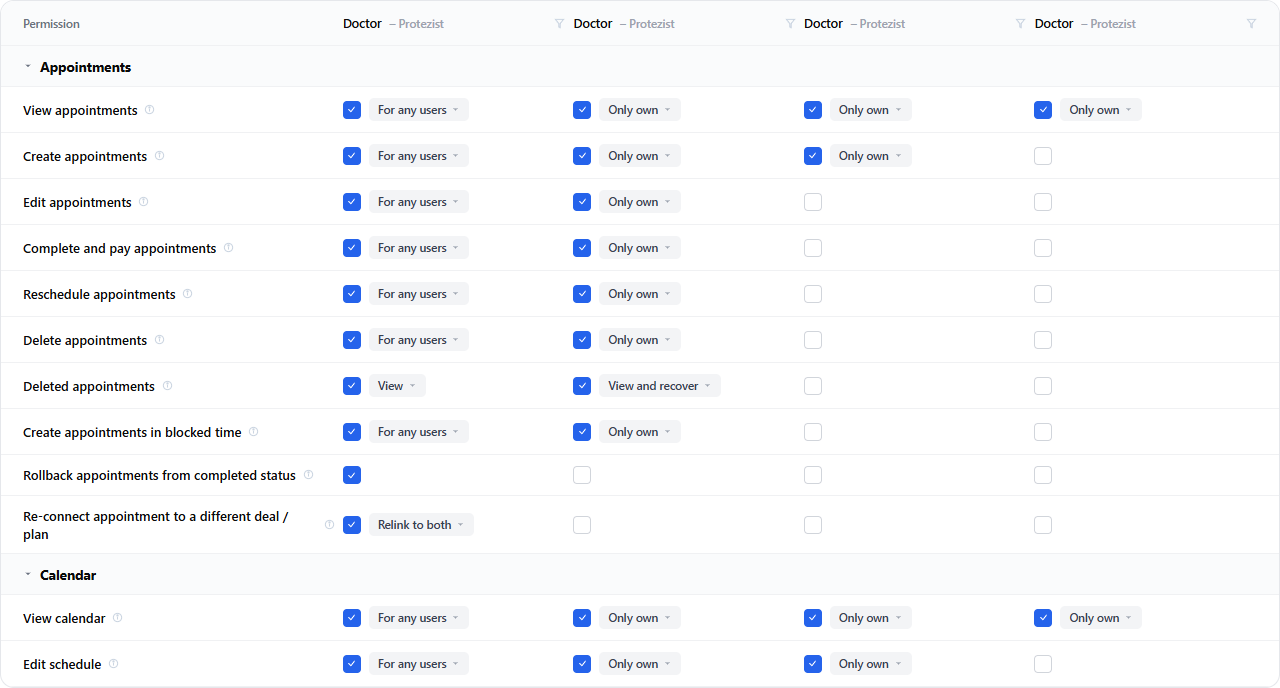
Predefined roles (Admin, Clinic manager, Doctor, Front desk, Assistant, Accountant) plus custom roles of your own. Per module: view / create / edit / delete / export. Per sensitive field: explicit access (e.g. “HIV results” for the attending doctor only).
Permission
Doctor
– Prosthodontist
Doctor
– Prosthodontist
Doctor
– Prosthodontist
Doctor
– Prosthodontist
Appointments
View appointments
For any users
Only own
Only own
Only own
Create appointments
For any users
Only own
Only own
Edit appointments
For any users
Only own
Complete and pay appointments
For any users
Only own
Reschedule appointments
For any users
Only own
Delete appointments
For any users
Only own
Deleted appointments
View
View and recover
Create appointments in blocked time
For any users
Only own
Rollback appointments from completed status
Re-connect appointment to a different deal / plan
Relink to both
Calendar
View calendar
For any users
Only own
Only own
Only own
Edit schedule
For any users
Only own
Only own
05 Sessions & inactivity
Automatic logout when you leave your computer unattended.
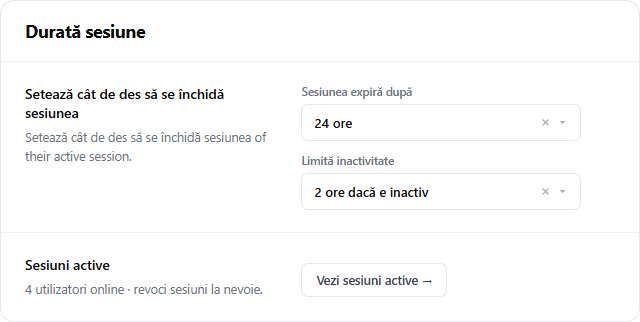
Set how long a session lasts and after how much inactivity it closes automatically. Distinguish between trusted devices (24h) and public browsers (forced re-login).
Session duration
Set how often the session closes
Set how often users are signed out of their active session.
Session expires after
24 hours
Inactivity limit
2 hours if inactive
Active sessions
4 users online · revoke sessions as needed.
06 Audit log & GDPR compliance
Everything that happened — who, when, what changed.
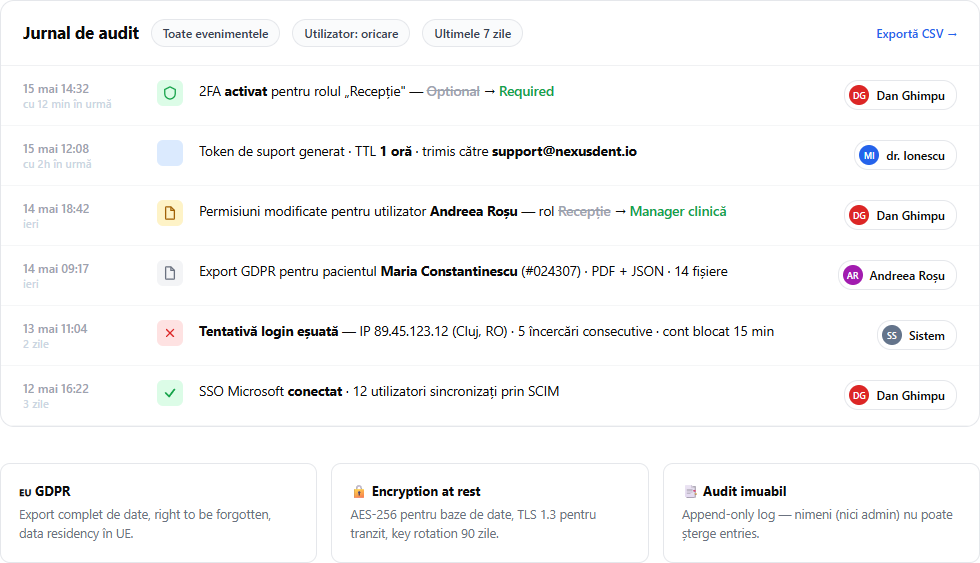
Every sensitive action (login, permission change, patient update, deletion, GDPR export) is logged immutably with timestamp, author and diff. Exportable for auditors, editable by no one — not even admins.
Audit log
All events User: any Last 7 days Export CSV →
May 15 14:3212 min ago
2FA enabled for the „Front desk" role — Optional → Required
DGDan Ghimpu
May 15 12:082h ago
Support token generated · TTL 1 hour · sent to support@dentumcloud.com
MIDr. Ionescu
May 14 18:42yesterday
Permissions changed for user Andreea Roșu — role Front desk → Clinic manager
DGDan Ghimpu
May 14 09:17yesterday
GDPR export for patient Maria Constantinescu (#024307) · PDF + JSON · 14 files
ARAndreea Roșu
May 13 11:042 days
Failed login attempt — IP 89.45.123.12 (Cluj, RO) · 5 consecutive attempts · account locked 15 min
SSSystem
May 12 16:223 days
Microsoft SSO connected · 12 users synced via SCIM
DGDan Ghimpu
🇪🇺 GDPR
Full data export, right to be forgotten, EU data residency.
🔒 Encryption at rest
AES-256 for databases, TLS 1.3 in transit, 90-day key rotation.
📑 Immutable audit
Append-only log — no one (not even admins) can delete entries.
FAQ · SECURITY MODULE
Security & compliance questions
Which SSO methods are supported?
Google Workspace, Microsoft Entra ID (Azure AD), Okta, generic SAML 2.0 and OIDC. The connector takes 5 minutes to set up, with domain-to-role mapping and auto-provisioning on first login.
How is 2FA configured?
We support TOTP (Google Authenticator, Authy, 1Password), SMS (with fallback) and push notifications via the mobile app. You can make 2FA optional for the whole team or mandatory for sensitive roles (Owner, Manager, Accountant).
Can I create custom roles?
Yes. Beyond the predefined roles (Admin, Manager, Doctor, Front desk, Assistant, Accountant), you can create your own roles with granular permissions per module and per action (view / create / edit / delete / export). Scope (For any users / Only own / Relink to both etc.) is configurable per row.
What does the audit log contain?
Every action: who, what they did, when, from which IP / device, old and new value (for edits). Views of sensitive records, GDPR exports, permission changes, failed logins — all recorded and exportable (PDF / CSV) for external audits.
Can I restrict access by IP or email domain?
Yes. IP whitelisting (e.g. clinic network only), corporate domain restriction (only @clinicapieselor.ro), blacklisting of suspicious IPs. Configurable globally or per role.
How do you protect sensitive data (HIV, allergies, etc.)?
Sensitive fields have explicit permissions, separate from the rest of the record. Access is logged per field, with a mandatory reason (“clinical consultation”, “GDPR export”). Data encrypted at rest with AES-256 and in transit with TLS 1.3.
How does session management work?
See all active sessions per user (device, browser, location, IP). Force logout in one click, set automatic expiry (idle timeout, max session length), and invalidate all sessions on password change.
Are you GDPR / HIPAA compliant?
GDPR — yes, fully: rights of access, rectification, erasure and portability. One-click GDPR export. DPA available. HIPAA — for US practices, we deliver on HIPAA-eligible infrastructure (AWS BAA) with a signed BAA on request. ISO 27001 certification in progress.