
Answers to the most common questions about service setup, pricing and procedures.
⚡Module · Clinical
Your catalog, as a living backbone.
Every service with duration, unit, versioned pricing, procedure steps, warranty rules and eligibility policies. Ever-changing catalogs become a single source of truth.
8
sub-features
4
unit types
∞
price versions
Services
Catalog
Categories
Packages
Warranties
Name
Duration
Current price
Status
Therapy14 services
Anterior dental restorations
30 min
EUR120
Light-cured filling
45 min
EUR95
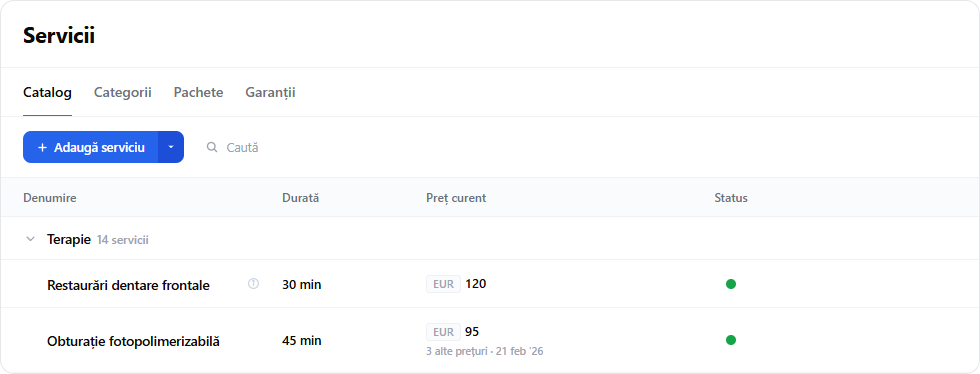
01 Catalog & categories
All your services, logically grouped. Editable without code.
Hierarchical categories (Therapy / Surgery / Prosthetic rehabilitation), each with its own services. Instantly see the duration, final procedure, current price and status.
Services
Users
Teams
Roles & permissions
Security policies
Name
Duration
Final procedure
Current price
Status
Therapy14 services
Anterior dental restorations
30 minutes
—
EUR120
ACTIVE
Light-cured filling
45 minutes
—
EUR95
ACTIVE
Professional Dental Cleaning
45 minutes
—
EUR70
ARCHIVEDJan 20 '26 · Stefan
+ Add new service
Surgery8 services
Atypical wisdom tooth extraction
45 minutes
Post-op
EUR240
ACTIVE
+ Add new service
Implant-prosthetic rehabilitation5 services
All-on-4 fixed prosthesis
4 hours 30 min
Fitting
EUR12.000
ARCHIVEDJan 20 '26 · Stefan
+ Add new service
Add new category
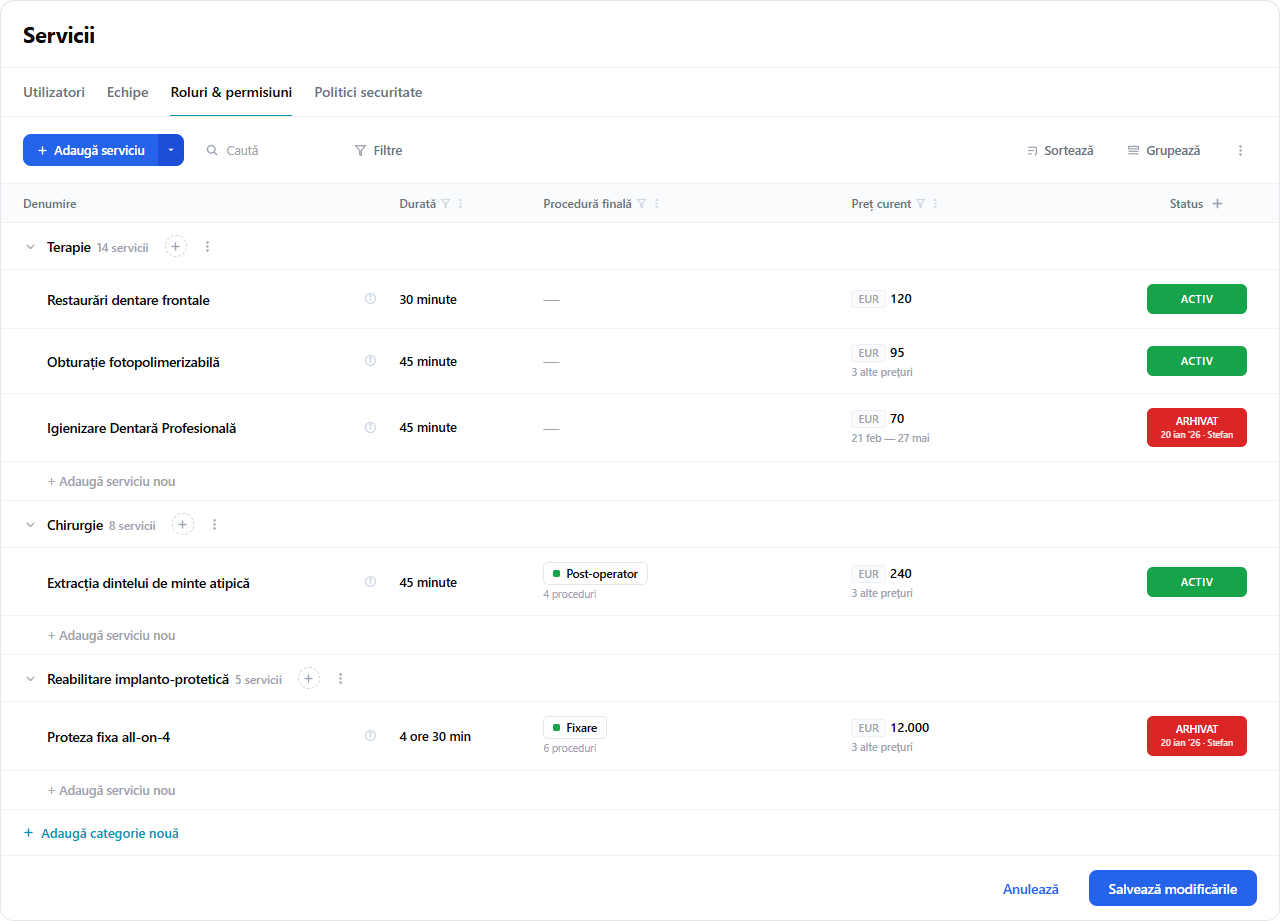
- Categories with subgroups — unlimited hierarchy: Therapy → Endodontics → Retreatment. Drag-and-drop to reorganize.
- Status per service — Active (green) / Archived (red) with the archive date and author. Archived services remain available for existing plans.
- Filters & sorting on any column — duration, price, last modified, number of procedures.
- Granular permissions — who can edit the catalog, who can only view it. Every change is audited.
02 Service setup
The essentials: duration, unit, category, restrictions.
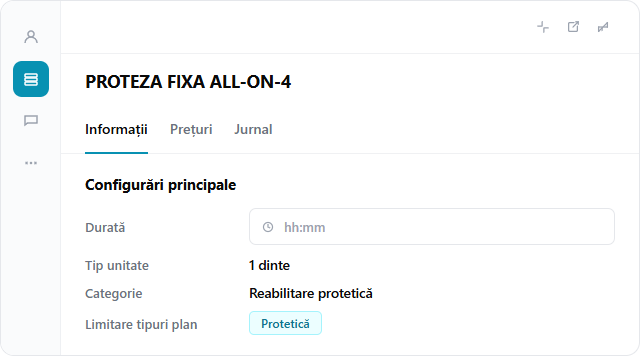
The core fields that define a service — used for time estimates in the calendar, booking validations and treatment plan restrictions.
- Standard duration per service — used automatically at booking to estimate the total visit time.
- Unit type — tooth, quadrant, arch, session. Determines how you select "where" the service applies.
- Category — the service group it belongs to (affects reporting and doctor KPIs).
- Plan restrictions — the service only appears in allowed plan types (e.g. Prosthetics only, not Therapy).
All-on-4 fixed prosthesis
Information
Prices
Log
Main settings
Duration
hh:mm
Unit type
1 tooth
Category
Prosthetic rehabilitation
Plan type restriction
Prosthodontics
03 Unit types
Four ways to "apply" a service.
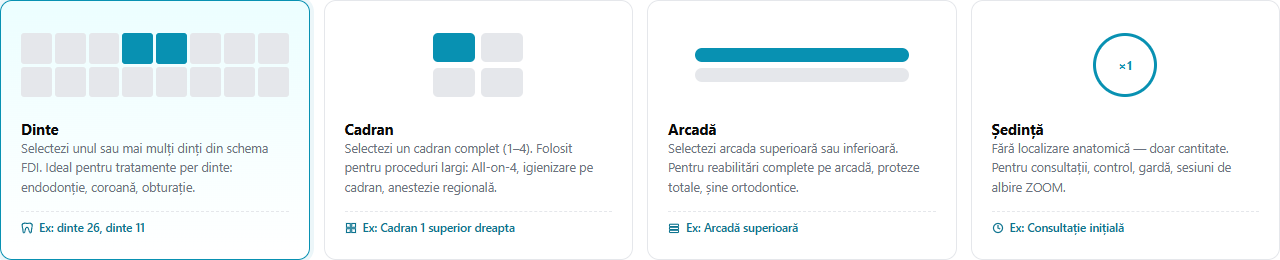
Every service has a unit type that determines how you assign it in the treatment plan and on the dental chart: per tooth, quadrant, arch or session.
Tooth
You select one or more teeth from the FDI chart. Ideal for per-tooth treatments: endodontics, crown, filling.
E.g.: tooth 26, tooth 11
Quadrant
You select a full quadrant (1–4). Used for broad procedures: All-on-4, quadrant cleaning, regional anesthesia.
E.g.: Quadrant 1 upper right
Arch
You select the upper or lower arch. For full-arch rehabilitations, complete dentures, orthodontic splints.
E.g.: Upper arch
×1
Session
No anatomical location — quantity only. For consultations, checkups, emergency visits, ZOOM whitening sessions.
E.g.: Initial consultation
- Automatic validation — you can't select a tooth for a "session"-type service. The system prevents impossible combinations.
- Quantity per unit — for services applied multiple times (e.g. "Filling ×4" on 4 different teeth).
- Built-in FDI chart — the tooth selector shows the exact arch and supports multi-select with Ctrl-click.
- Bundles — a service can combine multiple units (e.g. All-on-4 = quadrant + prosthetic session).
04 Procedures & steps
Complex services? Broken down into steps. With one "final" step.
A service can be a single step or a sequence of procedures (Impression → Try-in → Extraction → Fixation). Mark the "final" step to close the service automatically on completion.
Step 1
Impression
Custom impression for implant.
Step 2
Try-in
Prosthetic fit check.
Step 3
Extraction
Removal of non-viable teeth.
Final step
Step 4
Fitting
Final cementation · closes the service.
Procedures
Disable procedures
Enable procedures
Impression
Mark as final step
Try-in
Mark as final step
Extraction
Mark as final step
Fitting
Mark as final step
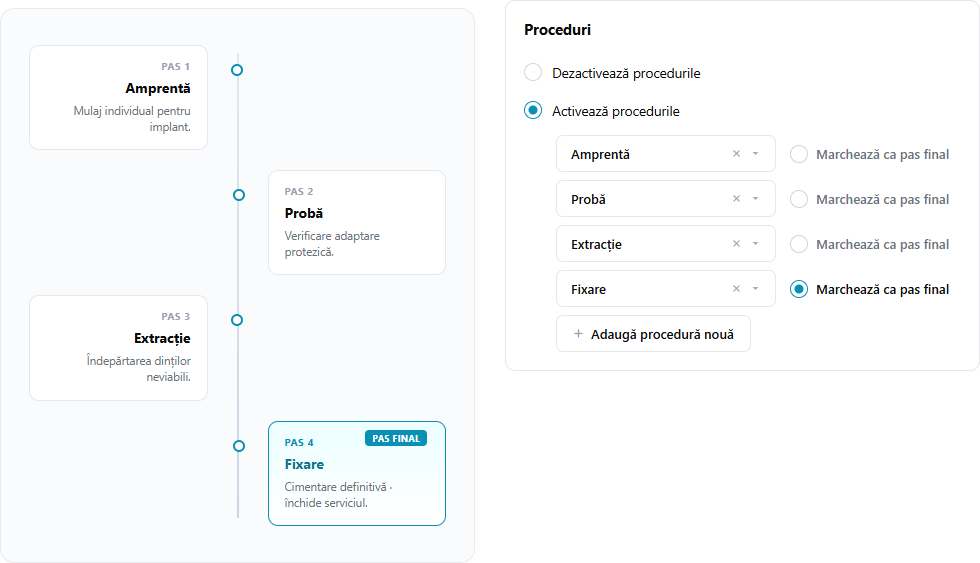
- Disable / Enable procedures — leave them off for simple services (consultation). Turn them on for complex ones (All-on-X).
- A single "final" step — all others are intermediate. The system automatically suggests "Fixation" / "Cementation" / "Delivery".
- Procedures show up at booking — the front desk can assign only the current step to the current visit.
06 Price history
New price? New version. Old plans keep their price.
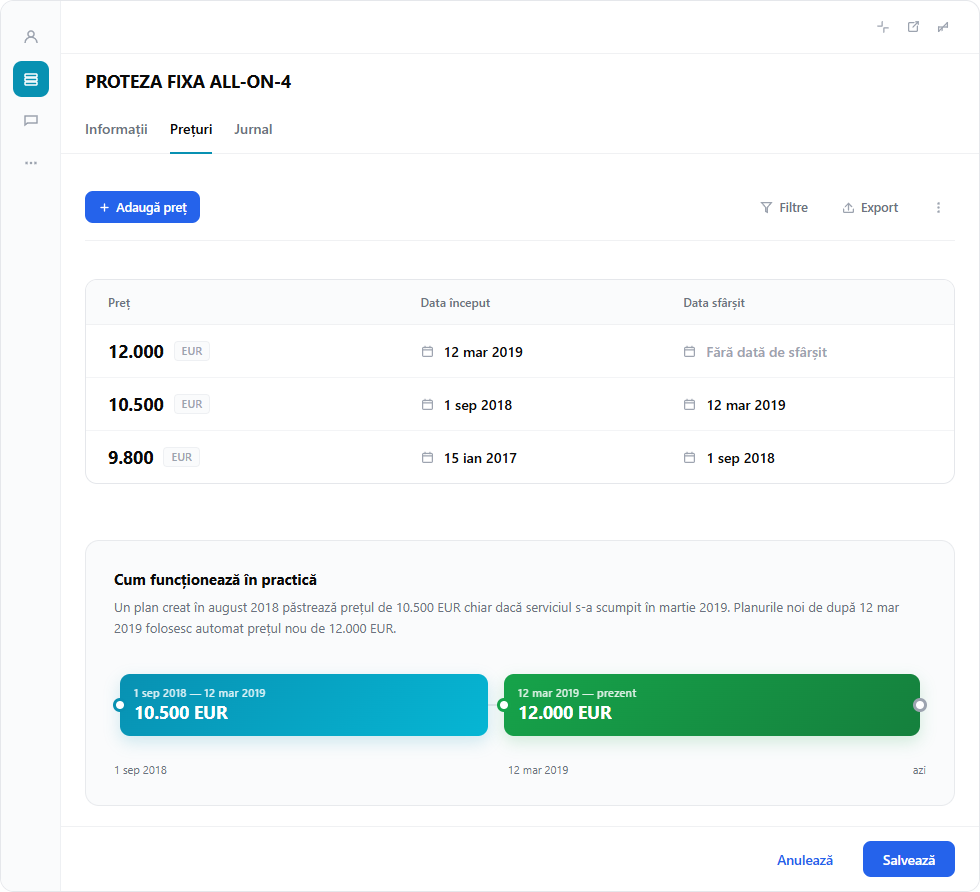
Every price has a start and end date. Appointments from a plan created in 2024 keep the price valid at that time — even if the service has become more expensive since.
All-on-4 fixed prosthesis
Information
Prices
Log
Price
Start date
End date
12.000
EUR
Mar 12, 2019
No end date
10.500
EUR
Sep 1, 2018
Mar 12, 2019
9.800
EUR
Jan 15, 2017
Sep 1, 2018
How it works in practice
A plan created in August 2018 keeps the 10.500 EUR price even if the service became more expensive in March 2019. New plans after Mar 12, 2019 automatically use the new 12.000 EUR price.
Sep 1, 2018 — Mar 12, 2019 10.500 EUR
Mar 12, 2019 — present 12.000 EUR
Sep 1, 2018
Mar 12, 2019
today
- Immutable per plan — once a plan is accepted, the price stays fixed regardless of future changes.
- Single currency (EUR) — one pricing standard across all locations and plans. Fewer errors, simple comparisons, no ambiguous conversions.
- Overlap detection — the system warns you if two price periods overlap on the same service.
- Manual override — in a plan/appointment, the doctor can override the price with a mandatory reason. Full audit trail.
07 Eligibility rules
What can you do with a service? Three toggles.
Every price has a start and end date. Appointments from a plan created in 2024 keep the price valid at that time — even if the service has become more expensive since.
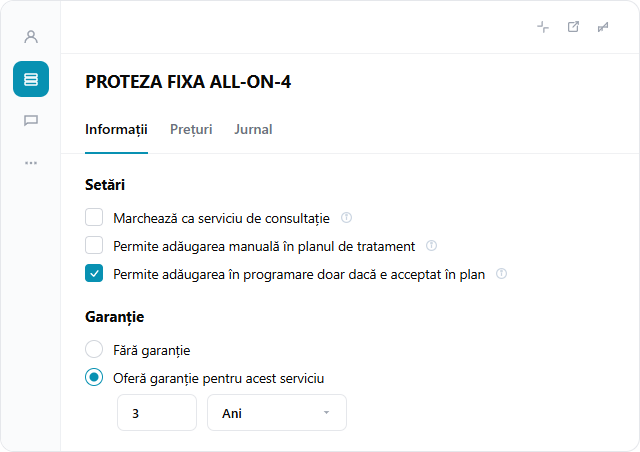
Define whether a service is a simple consultation, whether it can be added manually to a plan, or whether the patient must first accept the plan before it can be booked.
- Consultation service — excluded from KPIs, short duration, no plan required. Used for first contact.
- Manual addition to plan — control whether the doctor can add the service on top of the proposed plan, or only from the catalog.
- Mandatory acceptance — for high-value services (implants, all-on) require the plan to be signed by the patient before it can be booked.
- Role restrictions — the front desk can't add certain services beyond the doctor's rule — it shows a warning or blocks the action.
All-on-4 fixed prosthesis
Information
Prices
Log
Settings
Mark as consultation service
Allow manual adding to the treatment plan
Allow adding to an appointment only if accepted in the plan
Warranty
No warranty
Offer a warranty for this service
3
Years
08 Search, audit & log
Who changed what, when and why — no exceptions.
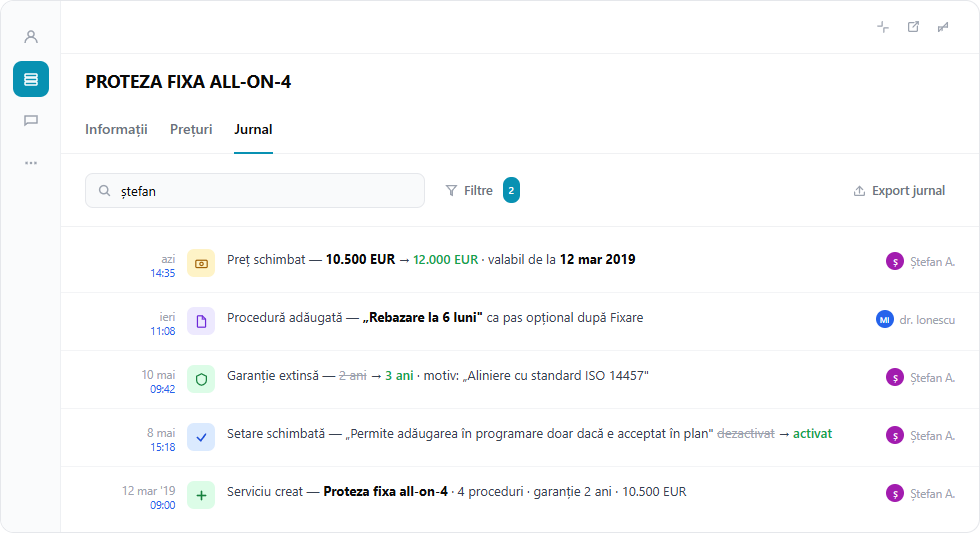
Every catalog change (new price, archived service, modified procedure, extended warranty) is logged with author, timestamp and diff. Filterable, exportable.
All-on-4 fixed prosthesis
Information
Prices
Log
today14:35
Price changed — 10.500 EUR → 12.000 EUR · valid from Mar 12, 2019
ȘȘtefan A.
yesterday11:08
Procedure added — „Relining at 6 months" as an optional step after Fitting
MIDr. Ionescu
May 1009:42
Extended warranty — 2 years → 3 years · reason: „Alignment with ISO 14457 standard"
ȘȘtefan A.
May 815:18
Setting changed — „Allow adding to an appointment only if accepted in the plan" disabled → enabled
ȘȘtefan A.
Mar 12 '1909:00
Service created — All-on-4 fixed prosthesis · 4 procedures · 2-year warranty · 10.500 EUR
ȘȘtefan A.
- Field-level audit — see the old vs. new value for every change (price, warranty, procedure).
- Mandatory reason for sensitive changes — price, warranty, service status.
- Filters & search in the log by author, event type, period.
- Log export as CSV for external audits or ISO compliance.
FAQ · SERVICES & CATALOG MODULE
Questions about the catalog & services
What happens to old plans when I change a service's price?
Nothing — accepted plans "freeze" the price valid at the time of acceptance. A catalog price change only affects new plans created after the new version's start date. That way, patients never get an invoice higher than the plan they signed.
Can I have different prices per location?
Yes. For networks with locations in different cities, each service can have its own prices per location (with independent history). The calendar and treatment plan automatically pick the price valid for the location chosen for the appointment.
How do procedures (steps) work?
Procedures are the ordered stages of a complex service (Impression → Try-in → Extraction → Fixation). One of them is marked as the "final step" — when that procedure is completed, the entire service closes automatically, the warranty kicks in and the doctor's KPI is generated.
Can I archive a service without affecting existing plans?
Yes. Archiving removes the service from the catalog available for new plans, but doesn't affect existing plans — they stay operational with the archived service. Archived services are shown with a red badge and the archive date for auditing.
How do I enforce "mandatory acceptance" for high-value services?
In the service settings, enable "Allow booking only if accepted in the plan". For implants, all-on and other high-value work, the patient must accept the plan (digital signature) before the front desk can book the service. It ensures consent and covers the financial side.
How is the total duration of a multi-service visit calculated?
The sum of the durations of the services in the appointment, with a manual override option. The front desk sees the automatically estimated duration in the calendar, but can adjust it if the patient requests an extra consultation or if multiple services on the same tooth allow for a shorter visit.
Can I import my existing catalog from Excel?
Yes. Our migration team supports importing from Excel/CSV with column mapping (name, category, duration, price). For practices coming from DentalNet, OptiDent or other platforms, we offer dedicated connectors. Migration includes price history if it's available in the source.
Can I create service bundles?
Yes. A "bundle" service can combine several individual services (e.g. All-on-4 = 4× Implant + Prosthesis + Extractions + Temporaries). The bundle has its own price (usually lower than the sum), but each component keeps individual tracking for KPIs and warranty.