
Answers to the most common questions about appointments, doctor schedules and patient integration.
⚡Automation & trigger engine
Your practice schedule,
no surprises.
See the whole day by doctor and by practice, validate times automatically, book quickly with drag & drop. Every appointment is linked to the patient, treatment plan and payment — all in sync.
8
sub-features
7
appointment statuses
∞
doctors & practices
08:00
09:00
10:00
11:00
12:00
13:00
14:00
MI
Dr. Ionescu
MC Maria Constantinescu
10:00 — 11:30
Endodontics26
AP Andrei Popa
14:00 — 15:00
Cleaning
SM
Dr. Marcu
DD Diana D.
09:30 — 10:30
Implant36
GH
Dr. Hărău
AV
Dr. Vasile
MP Maria P.
11:00 — 11:30
AP
Dr. Pop
Busy
MI Maria Ioniță
12:00 — 13:00
Scaling
11:45
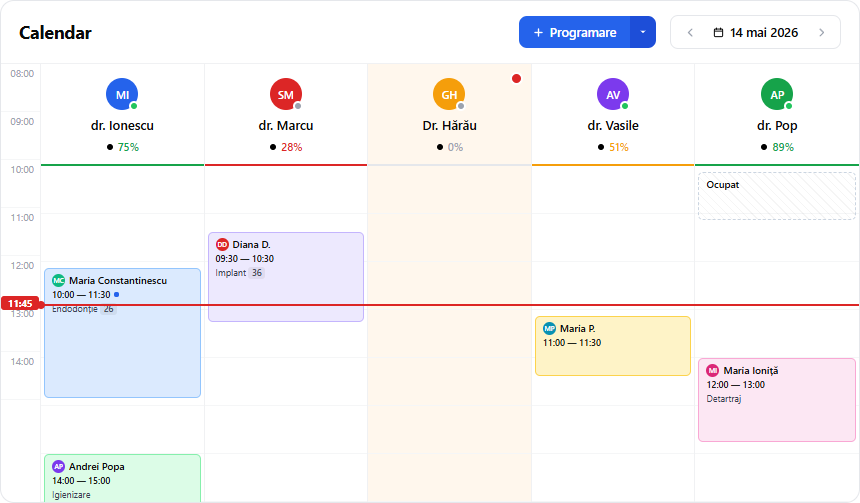
01 Calendar views
A whole day, every doctor, one glance.
Day view with every practice and active doctor, or week view for a single doctor. Columns colored by occupancy, color-coded appointments, unavailability clearly marked.
07:00
07:30
08:00
08:30
09:00
09:30
10:00
10:30
11:00
11:30
12:00
12:30
13:00
MI
Dr. Ionescu Maria
Wk. 53h 20m · Month 84h 28m
07:30 — 08:00
Busy
JG Iulian Grigore +382 691
11:00 — 14:30+2
Implant crown31
Final dentureAS
"Patient pays via barter"
BS
Dr. Stancu Bogdan
Wk. 53h 20m · Month 84h 28m
IS Ioana Stanca
07:00 — 11:30+2
Root canal2629+1
Implant crown31
Final dentureAS
"Patient pays via barter"
AH Andreea Hîrjău
10:30 — 11:00
Final dentureAS
unavailable
GH
Dr. Hărău Gheorghe
Wk. 0h 0m · Month 0h 0m
JG Iulian Grigore
08:30 — 09:30
Implant crown31
RR Radu Rusu
10:00 — 10:30
Root canal26
DM
Dr. Marin Diana
Wk. 53h 20m · Month 84h 28m
AH Andreea Hîrjău (244)
07:30 — 08:30+2
Root canal2629+1
AH Andreea Hîrjău
10:00 — 11:30
Final dentureAS
RR Radu Rusu
12:00 — 12:30
Implant crown31
AP
Dr. Pop Andreea
Wk. 53h 20m · Month 84h 28m
IS Ioana Stanca
09:00 — 12:30+2
Root canal2629+1
Implant crown31
Final dentureAS
"Patient pays via barter"
JG Iulian Grigore
12:00 — 12:30
11:45
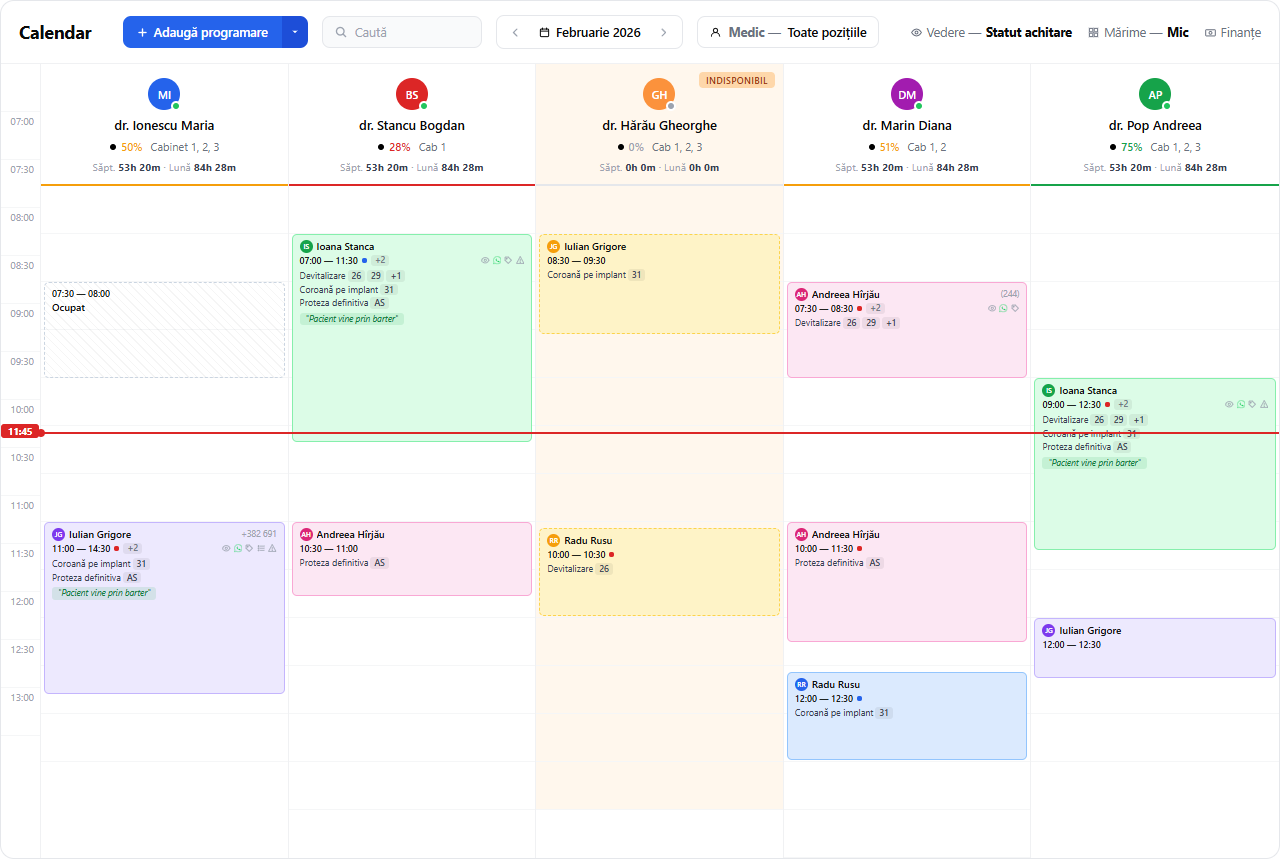
- Day view (multi-doctor) or week view per doctor — Day view as the default, Week view for individual analysis.
- Color-coded columns by occupancy rate — green (>70%), yellow (50-70%), red (<30%).
- Visible unavailability — doctors with zero appointments show as “unavailable” on an orange background.
- A red current-time line runs across the columns live, with a timestamp badge.
- Quick actions on the card — eye (view), WhatsApp, tag, service list, risk alert — all at a glance.
- Internal notes on the card (“Patient pays via barter”) visible to the front desk at first glance.
02 Appointment details & services
Model the visit exactly as it will happen.
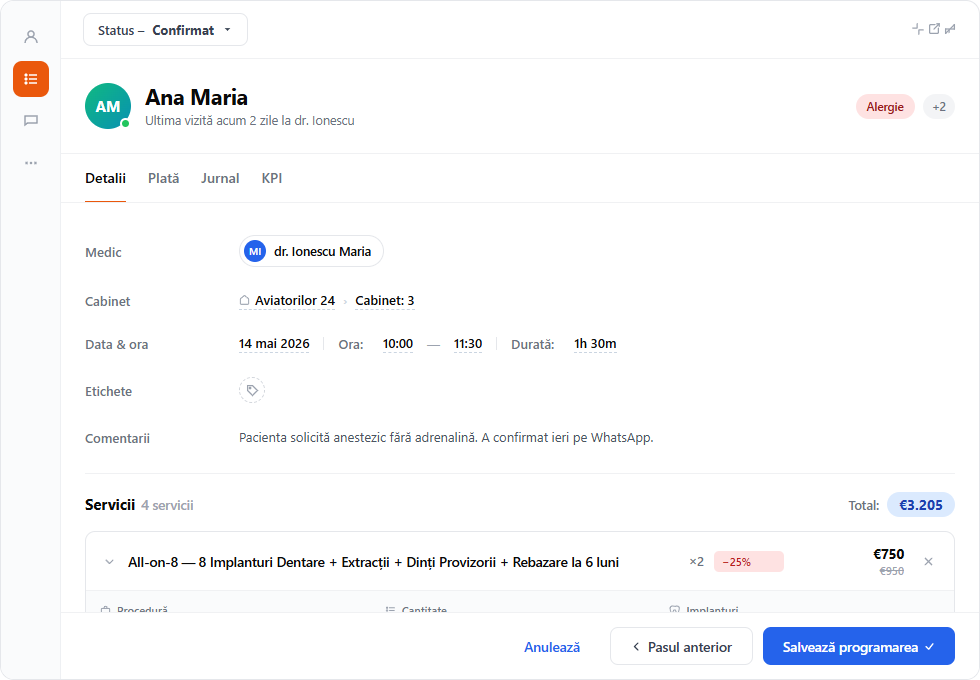
Doctor, practice, date, duration, services with quantities and discounts — all on a single screen, with reservations visible from the patient's plan.
- Multiple services per appointment with quantity, unit (tooth/quadrant), implant count, per-item discount.
- Reserved services from the patient's treatment plan — selectable in one click, assigned to the appointment.
- Duration calculated automatically from the sum of service durations, with manual override.
- Patient-facing comments or internal notes, synced with automated reminders.
AM
Ana Maria
Last visit 2 days ago with Dr. Ionescu
Allergy +2
Details Payment Log KPI
Doctor
MIDr. Ionescu Maria
Practice
Aviatorilor 24›Practice: 3
Date & time
May 14, 2026Time:10:00—11:30Duration:1h 30m
Labels
Comments
Patient requests anesthetic without adrenaline. Confirmed yesterday on WhatsApp.
Services4 services
Total: €3.205
All-on-8 — 8 Dental Implants + Extractions + Temporary Teeth + Relining at 6 months
×2
−25%
€750 €950
3D CT
×2
−25%
€750 €800
Endodontic retreatment
×2
€150
Tooth extraction
×2
€60
Select service
Endodontic retreatment
Booked service
Endodontic retreatment
Booked service
Standard crown
Booked service
03 Appointment lifecycle
Seven statuses. Clear rules. End-to-end automation.
From “scheduled” to “completed” — every transition triggers automations: reminders, plan updates, doctor commissions, e-invoices. Nothing manual.
1
Planned
2
Confirmed
3
Check-in
4
In progress
5
Completed
Transition rules
You can't mark “Completed” without a Check-in. You can't edit after “Completed” except via an explicit rollback. Rules configurable per practice.
Rollback on completion
Someone made a mistake? Clicking “Rollback” reverts payments, commissions and plan updates — all at once.
Cancellation with reason
Cancellations require a reason (configurable). The appointment isn't deleted — it becomes “Canceled” with full history for no-show reporting.
Linked rescheduling
Rescheduling creates a new appointment linked to the original — old slot + reason kept for history.
Per-transition triggers
Each status triggers actions: send SMS, move the deal in the CRM, allocate doctor commission, close the plan stage.
Soft-delete only
Appointments are never physically deleted — only archived. Only admins with a specific permission can purge (keeping the log).
Rescheduling with history intact
When a patient asks to move an appointment, the system doesn't overwrite the existing one — it creates a new appointment directly linked to the original, with the rescheduling reason, author and time. The old slot stays in the history for no-show analysis, audit and reporting.
Rescheduled #APP-2026-0142
May 10, 2026 · 14:30 — 15:30
Dr. Ionescu Maria
Aviatorilor practice · room 3
Endodontics 26 · 1h 30m
Original slot kept for audit · visible in no-show reports
Rescheduling reason Patient asks to reschedule — sick child May 12 · 09:14 · Andreea Roșu
Scheduled #APP-2026-0156
May 14, 2026 · 14:30 — 15:30
Dr. Ionescu Maria
Aviatorilor practice · room 3
Endodontics 26 · 1h 30m
Rescheduled from #APP-2026-0142
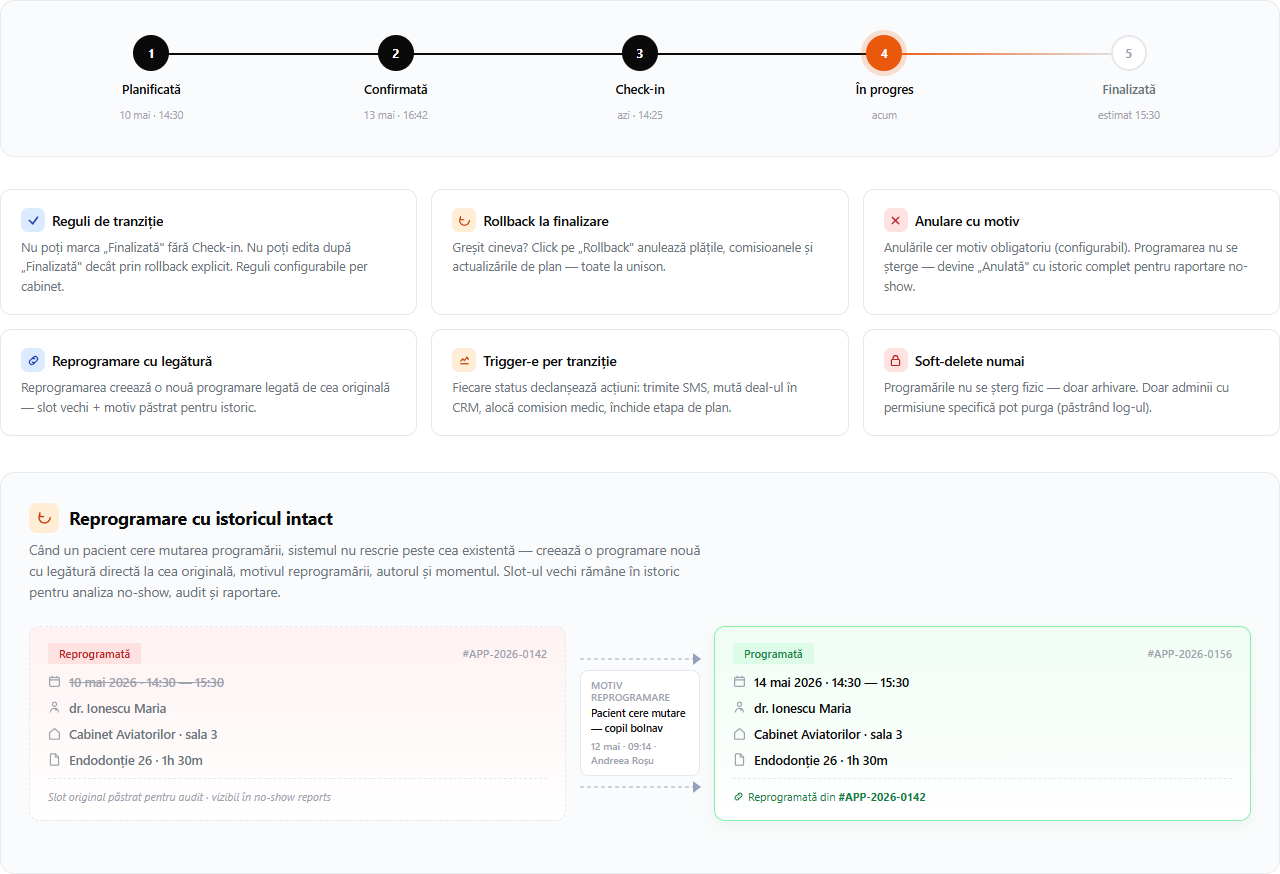
- Original slot kept as “Rescheduled” — never deleted, never overwritten.
- Mandatory reason documented with author and time.
- Automatic SMS/WhatsApp to the patient with the new time.
04 Payment at appointment completion
The visit is over. Payment? Three clicks.
Cash, card, balance, voucher, discount or mixed payment — all on a single screen. Live total, per-service breakdown, rollback when needed.
AM
Ana Maria
Last visit 2 days ago with Dr. Ionescu
Allergy +2
Details Payment Log KPI
Name
Unit price
Units
Price
Panoramic X-ray OPGUpper arch
€120,08
1
€120,08
* Root canal11, 12, 21, 22, 23, 31, 34, 35
€1,054
4
€8.435
Tooth extraction14, 16
€4,951
3
€14.854
Total €90,00
Discount −€12,00
Balance applied −€2,00
Paid in cash −€20,00
Paid by card −€22,00
Balance due €46,00
Pay €46,00 in cash
Pay €46,00 by card
Pay €46,00 from balance
Apply voucher
Apply % discount
Mixed payment (split)
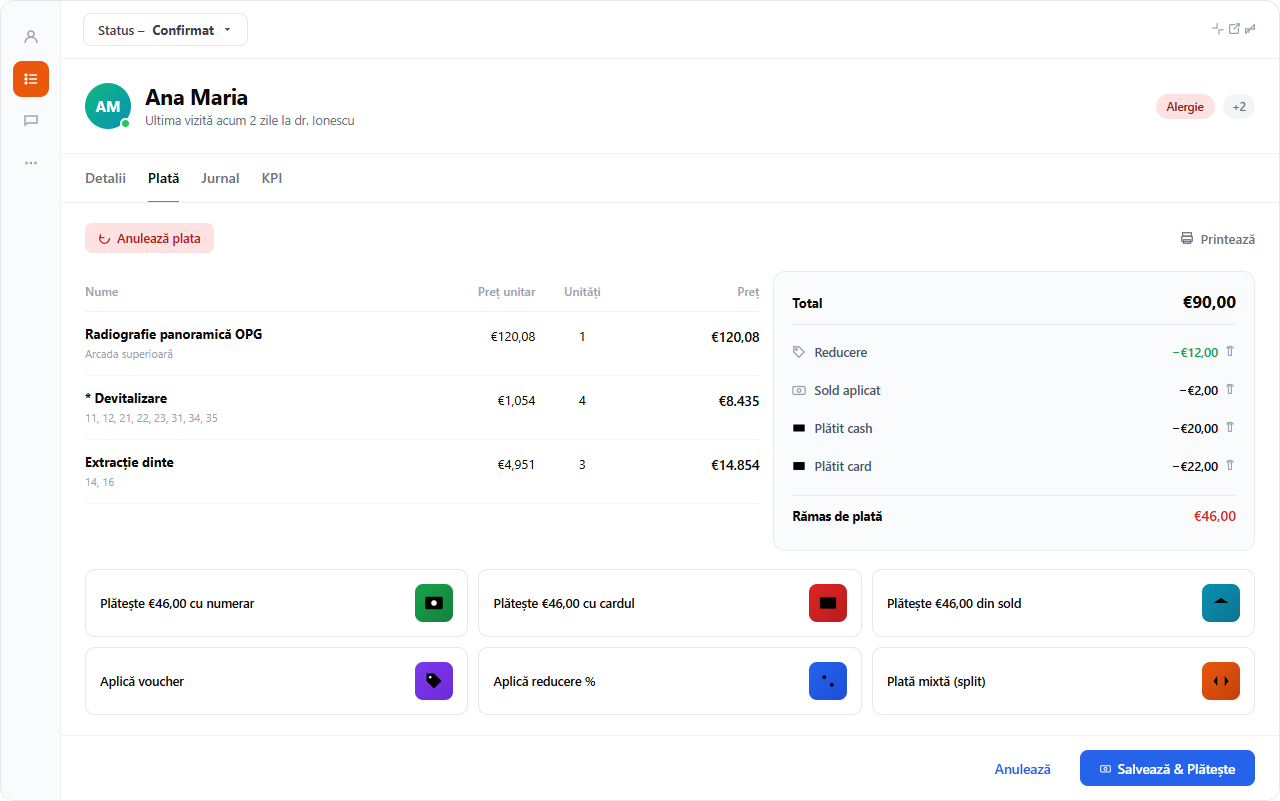
- 6 payment methods — cash, POS card, patient balance, voucher, % discount, mixed payment.
- Split payment — split the amount between methods (e.g. €20 cash + €26 card) in one click.
- Cash register integration — fiscal receipt issued automatically for cash or card payments.
- Full rollback — cancel the payment and the receipt, invoice, doctor commission and balance payment are canceled automatically.
05 Doctor KPI & commissions
Every service, every doctor, every commission.
See the KPI allocated to each service in the appointment — with the rules applied, discounts accounted for and the final cost. Per-doctor breakdown, instant totals.
AM
Ana Maria
Last visit 2 days ago with Dr. Ionescu
Allergy +2
Details Payment Log KPI
Service
KPI allocated
Discount
KPI rule
Cost
MIDr. Ionescu Maria Total KPI: €814
Tooth extraction
€414
−€32
20% of revenue
€271,04
All-on-4 with extractions and denture
€240
—
€240 flat/case
€71,04
Standard crown on implant
€160
−€16
15% of revenue
€144
APDr. Pop Andreea Total KPI: €184
Professional cleaning
€41
—
15% of revenue
€41,40
Scaling & brushing
€143
—
Level 2 (surgeon group)
€143
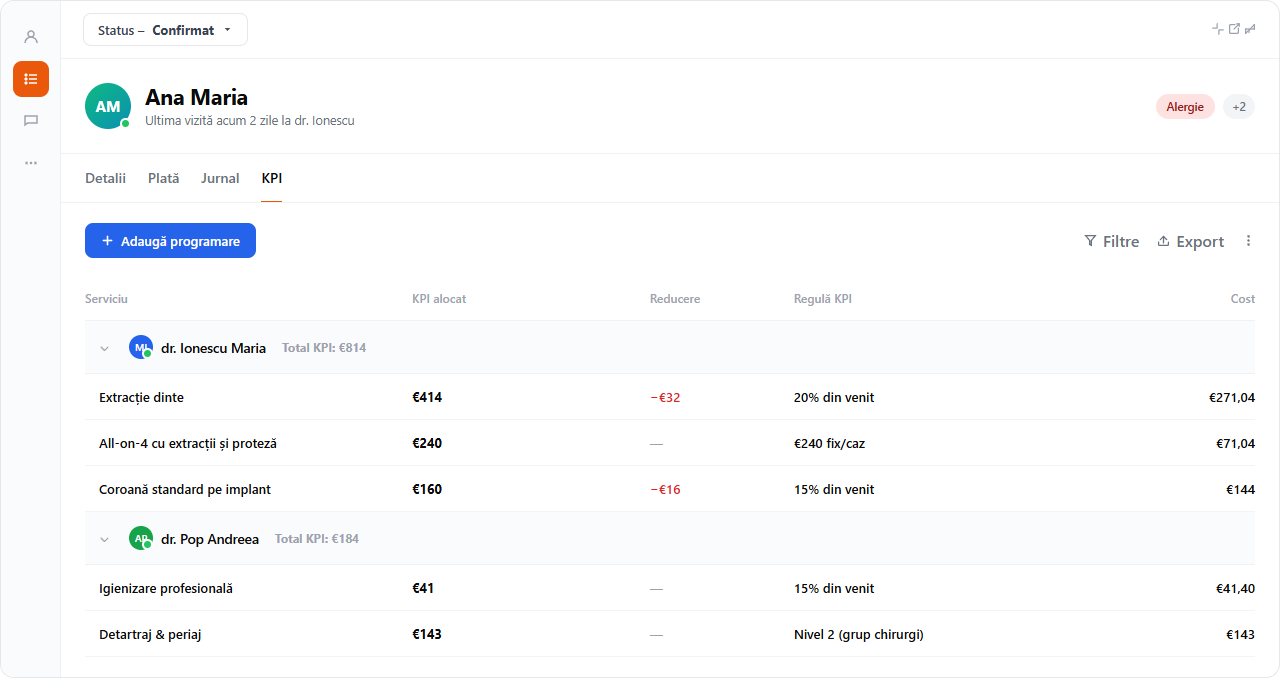
- Flexible KPI schemes — percentage of revenue, fixed amount per case, tier-based (by volume), per group of doctors.
- Per-doctor breakdown when an appointment involves several specialists — each with their own KPI on their services.
- Discounts deducted from KPI — configurable policies: the discount affects only revenue, or the doctor's commission too.
- Effective dates per rule — several KPI versions can be active over time, each with its own start date.
06 Rules, validation & integrations
A scheduling engine that won't allow impossible bookings.
Constraints on hours, practices, services and doctors. Plus two-way integration with the patient record, treatment plan and sales CRM.
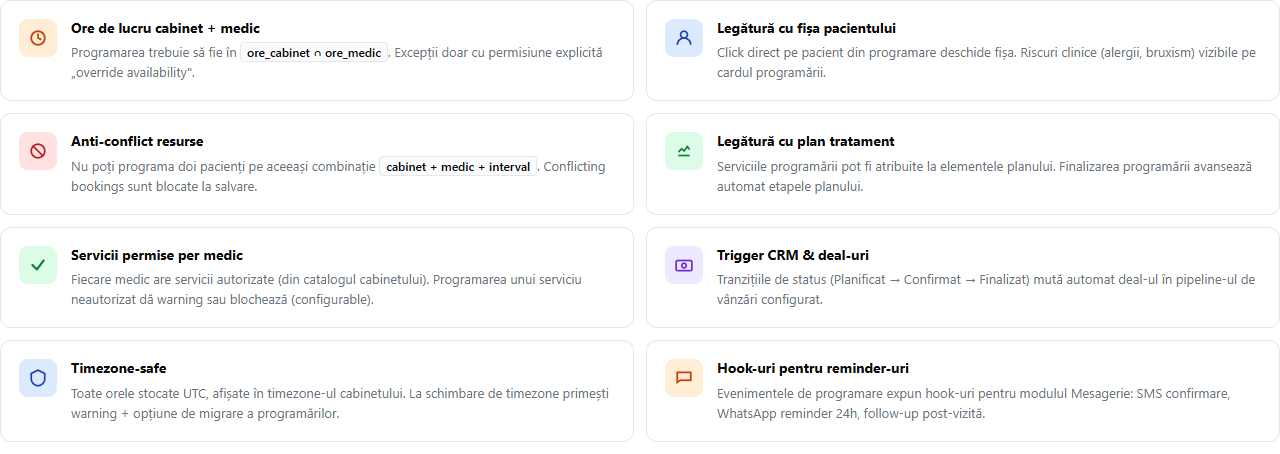
Practice + doctor working hours
The appointment must be within practice_hours ∩ doctor_hours. Exceptions only with explicit “override availability” permission.
Resource conflict prevention
You can't book two patients on the same combination of practice + doctor + time slot. Conflicting bookings are blocked on save.
Allowed services per doctor
Each doctor has authorized services (from the practice catalog). Booking an unauthorized service shows a warning or blocks it (configurable).
Timezone-safe
All times are stored in UTC and displayed in the practice's timezone. When the timezone changes, you get a warning + an option to migrate appointments.
Link to patient record
Clicking the patient in the appointment opens their record directly. Clinical risks (allergies, bruxism) are visible on the appointment card.
Link to treatment plan
Appointment services can be assigned to plan items. Completing the appointment automatically advances the plan stages.
CRM & deal triggers
Status transitions (Planned → Confirmed → Completed) automatically move the deal through the configured sales pipeline.
Reminder hooks
Appointment events expose hooks for the Messaging module: confirmation SMS, 24h WhatsApp reminder, post-visit follow-up.
07 Search, filters & reports
Every appointment in the clinic — filterable, exportable.
A cross-practice list of every appointment, operational filters (today / this week / no-show / payment pending), plus CSV/Excel export for external reporting.
All appointments
3 practices · 2.834 appointments in 30 days · 12 no-shows
Date & time
Patient
Doctor
Status
Services
Total
May 14 · 14:301h 30m
Maria Constantinescu+40 723 481 902
MI
Dr. Ionescu
In progress
Endodontics 26 · +3 services
€720
May 14 · 16:0045m
Andrei Popa+40 745 612 803
MI
Dr. Ionescu
Confirmed
Cleaning
€68
May 15 · 09:302h
Diana Dimitrescu+40 731 209 145
MI
Dr. Ionescu
Planned
Implant 36
€1.150
May 13 · 10:001h
Maria Popescu+40 752 814 660
MI
Dr. Ionescu
Completed
Scaling · +1 svc
€180
May 12 · 15:0030m
Maria-Ana Radu+40 729 318 522
MI
Dr. Ionescu
Canceled
no-show · 2h notice
€0
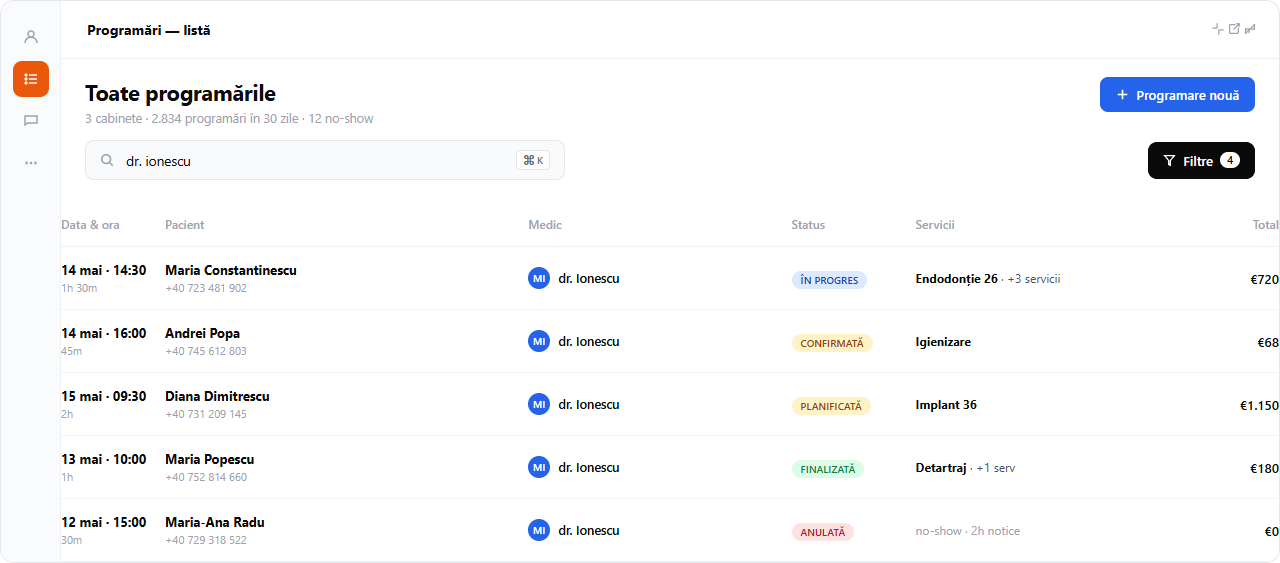
- Cross-practice filters — doctor, patient, status, date, services, with saved segments per user.
- CSV / Excel export of appointments for external reporting or accounting.
- Utilization reports — occupancy rate per doctor, no-show rate, actual vs. planned duration.
- Operational metrics — unallocated slots, underused practices, distribution by service.
FAQ · CALENDAR & APPOINTMENTS MODULE
Questions about the calendar and appointments
Can I have several practices with different schedules?
Yes. DentumCloud supports any number of practices and locations, each with its own schedule, doctors and resources. The calendar filters automatically by the selected practice, and each doctor can have a different schedule per practice (e.g. Mondays at location A, Tuesdays at location B).
How does drag & drop rescheduling work?
Grab the appointment card and move it to a new slot. The system checks for conflicts instantly — if the new slot is taken or outside working hours, you get a warning. On drop, it asks for the reason for rescheduling (optional) and automatically sends the patient a reminder with the new time.
Are automatic reminders sent to patients?
Yes, through the Messaging module. Set up automated rules: SMS 24h before, WhatsApp 2h before, Email confirmation on booking. The patient confirms by replying and the appointment status updates automatically to “Confirmed”.
Can I book multiple services in a single visit?
Yes. An appointment can contain any number of services. The duration is calculated automatically from the sum of service durations (configured in the catalog), with manual override. Each service can have its own quantity, unit (tooth, quadrant) and discount.
What happens to payments if I complete an appointment by mistake?
Clicking “Cancel payment” (rollback) reverses at once: the payment, the issued fiscal receipt, the ANAF invoice, the doctor's commission and the amount moved to the treatment plan. The appointment returns to its previous status and you can edit it again. Every action stays in the log.
Can I block a slot without assigning it to a patient?
Yes. Click the slot > “Block” and choose the reason: internal meeting, training, extended break, vacation. The slot becomes unavailable for booking, shown with a striped pattern on the calendar and linked to the reason for reporting.
How do I sync appointments with Google Calendar?
One-way sync DentumCloud → Google Calendar is available on the Cloud plan. Doctors connect their own Google account and see appointments on their personal phone. Changes are made only in DentumCloud (the source of truth). Outlook 365 sync is available on Self-hosted.